
BetterAntispam TeamHow we write these8 min read
How to Secure Your Discord Server From Bots
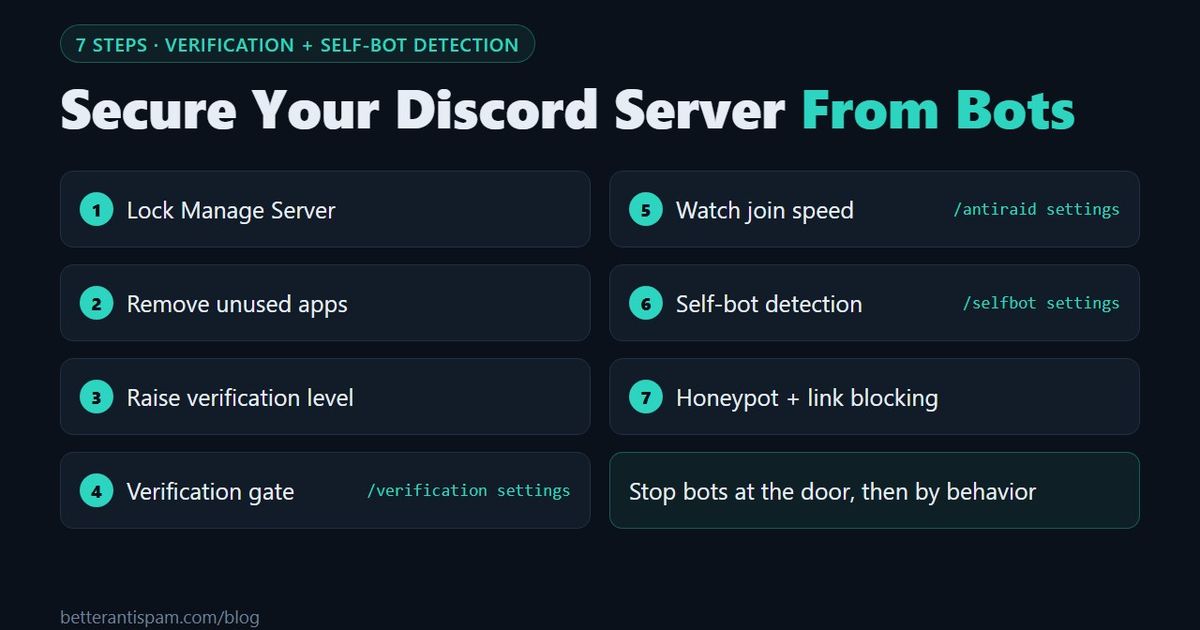
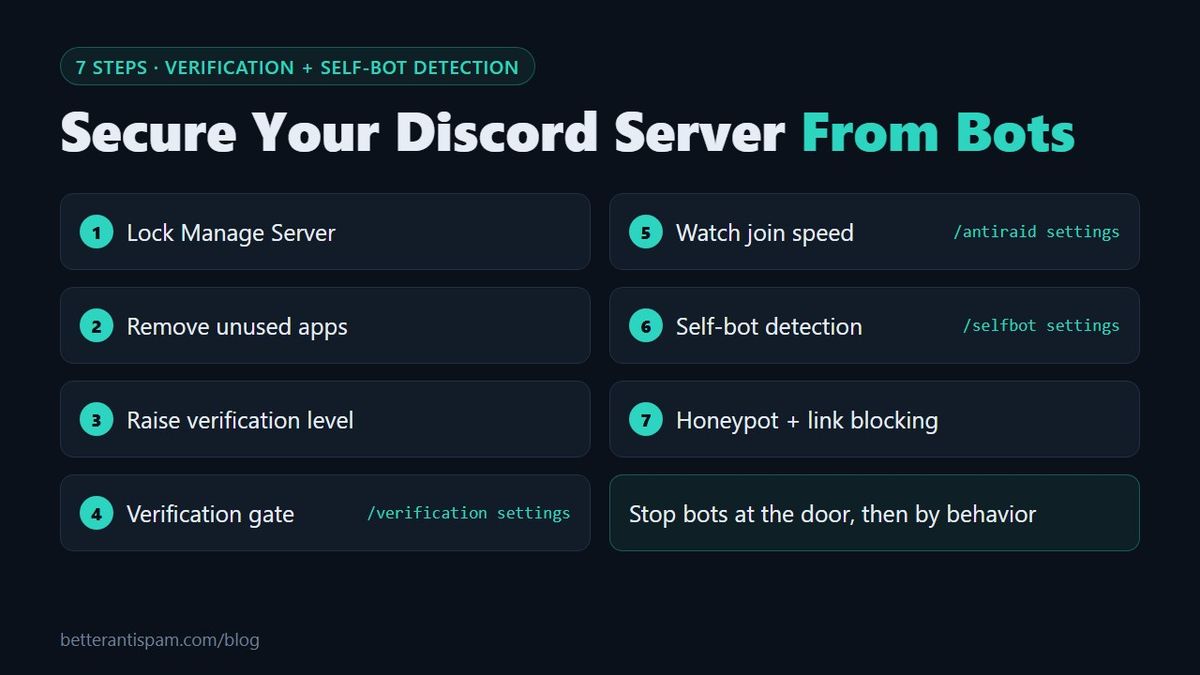
To secure a Discord server from bots, do three things. First, remove Manage Server from every role that should not add apps, because that permission is the only way a real bot gets in. Second, put a verification gate in front of your channels, so a scripted account that joins through an invite sees nothing until it passes a check. Third, turn on self-bot detection, which catches automated accounts by how they behave after they are inside. In BetterAntispam those are /verification settings and /selfbot settings (both require Administrator). Both are off until you turn them on, and both are free. The seven steps below go in order, starting with Discord's own settings. They protect a Discord server from spam bots, raid bots and self-bots without paying for a security bot.
Editorial disclosure: This guide is published by BetterAntispam. Discord's built-in settings come first. Bot defaults and command names come from the bot's source code, and I say which detectors are paid.
The three kinds of "bots" and what stops each
People use the word bot for three different things. Each one enters a different way.
| Kind | What it is | How it gets in | What stops it |
|---|---|---|---|
| App (real bot) | A Discord application with a bot tag | Someone with Manage Server authorizes it | Permissions, steps 1 and 2 |
| Self-bot / scripted account | A normal user account run by a script | An invite link, like any member | Verification and behavior detection, steps 3 to 6 |
| Hacked account | A real member's account, taken over and used to post scams | It is already inside | Honeypot and link blocking, step 7 |
Self-bots are against Discord's rules. Discord's self-bot article says automating a user account can get the account terminated. They have no bot tag and they do not appear under Integrations, so you cannot remove them the way you remove an app.
Step 1: Lock who can add apps
A Discord app can only be added by the owner or by someone with Manage Server. Open Server Settings → Roles and remove Manage Server from every role that does not need it. Do the same for Administrator, which includes it.
While you are in Roles, remove Create Invite from @everyone if you don't want every member to hand out invite links. Fewer invite links in circulation means fewer ways in for scripted accounts. Staff accounts matter too: require two-factor authentication for moderators, as described in step 1 of how to secure a Discord server.
Then run /scan (requires Administrator) in BetterAntispam. It lists roles with dangerous permissions and bots that hold Administrator. More on which permissions matter: Discord permissions explained.
Step 2: Remove apps you don't use
Open Server Settings → Integrations and kick every app nobody uses. Discord's integrations page explains the list. An unused bot with Administrator is a risk, because if its token leaks, the attacker gets those permissions. The audit log shows who added each bot and when.
In Roles, deny Use External Apps for @everyone. That stops members from running apps installed on their own account in your channels. The full walkthrough is in how to stop bots joining your Discord server.
Step 3: Raise Discord's verification level
Open Server Settings → Safety Setup and set the verification level:
| Level | What a new member needs before they can chat |
|---|---|
| Low | A verified email |
| Medium | A verified email and an account registered for more than 5 minutes |
| High | The same, plus more than 10 minutes as a member of your server |
| Highest | A verified phone number |
Medium stops accounts created seconds ago. High gives your moderators and your bot 10 minutes to react. Highest stops the most bots, but it also stops real people who have no phone on their account. Details: Discord verification level.
This slows bots down. It does not stop a bot that uses older accounts with a verified email. A verified phone number also overrides the other requirements, so an account with a phone passes every level.
Community servers can add Rules Screening as well. New members must agree to your rules before they can talk, react or DM other members. It is one more step for a script, but it is not a captcha.
Step 4: Add a verification gate
A verification gate hides every channel from new members until they pass a check. A script that joins sees one channel and a button. If it cannot pass, it never reaches your members.
- Run
/verification settings(requires Administrator) and turn it on. It is off by default. - Choose the check:
| Check | What the member does | Good against |
|---|---|---|
| Website Captcha | Opens a web page with a captcha. The page also checks for VPNs, proxies and alt accounts | Scripts, ban evaders, alt accounts |
| Image captcha | Types the letters from an image | Scripts |
| Math question | Solves a short sum | Simple scripts |
| Word puzzle | Unscrambles a short English word | Simple scripts |
| Click to pass | Presses one button | Only the laziest scripts |
- Choose what happens when time runs out: kick, timeout, quarantine role or nothing. With kick, the person can rejoin and try again.
- Check that
@everyonecannot see your normal channels and that the verified role can.
The one-button check is easy for people, but a script can press a button. For a server that is being targeted, use the website captcha or the image captcha. Product pages: verification, captcha, alt detection and VPN blocker. Longer guides: Discord verification bot and Discord captcha bot.
Step 5: Watch how fast accounts join
Bots often join in groups. /antiraid settings (requires Administrator) watches the join rate and scores each new account for suspicion.
The limit scales with server size. In a server under 50 members, 3 joins in 10 seconds is worth noticing and 5 is a strong signal. With auto-scale off, the default is 5 joins in 10 seconds. Suspected raiders can be sent a captcha with 120 seconds to solve it. Actions include kick, ban, timeout and an automatic lockdown.
Discord has its own version for Community servers. Under Server Settings → Safety Setup → Raid Protection, Discord can alert you when it detects a join raid and require a CAPTCHA from new joiners for the next hour. Turn it on. It works alongside a bot and costs nothing.
If a wave is already arriving, open Server Settings → Invites and use Pause Invites, then run /raidmode enable (Administrator). Guide: what is a Discord raid. Product page: anti-raid.
Step 6: Detect self-bots by behavior
Some scripted accounts pass verification, because a person solves the captcha once and then starts the script. After that, the only way to find them is by what they do. A script does things a person cannot: it answers in a fraction of a second, sends messages without ever showing "is typing", and edits or deletes in bursts.
Run /selfbot settings (requires Administrator) and turn it on. It is off by default.
| Signal | What it looks for | Plan |
|---|---|---|
| Embeds & slash | Bursts of embeds or app commands from a user account | Free |
| Mass nickname, username or display name change | A nickname, username or display name that changes in rapid bursts | Free |
| Typing | Messages sent without a typing signal | Shield |
| Fast replies | Replies faster than a person can type | Shield |
| Edit spam | Many edits in a burst | Shield |
| Rapid self-delete | Messages posted and deleted within seconds | Shield |
| Reaction spam | Bursts of reactions | Shield |
| Mass custom status change | A custom status that changes in rapid bursts | Shield |
Each signal adds a strike. By default, 2 detections within 10 minutes trigger the punishment, which is a 5-minute timeout. On the Punishment page you can switch to kick, ban or the quarantine role, and on Limits you can change how many detections are needed.
Honest limits. Behavior detection can flag a very fast human, so start with timeout or quarantine, not ban, and put trusted roles on the Whitelist page. A slow self-bot that posts once an hour will not reach the limit. And if the bot's role sits below the member's highest role, the punishment fails silently, so drag the BetterAntispam role near the top. Product page: self-bot detection.
Step 7: Trap and filter what is left
The last group is hacked accounts. They are real members who passed verification long ago, and they don't behave like scripts until the moment they post a scam in every channel.
- Honeypot.
/honeypot settings(requires Manage Server) creates a trap channel that no real member should post in. An account that pastes its scam everywhere posts there too and is softbanned by default: banned with its recent messages deleted, then unbanned so the owner can come back. Guide: how to make a honeypot channel. - Link blocking.
/adblock settings(Administrator) deletes invites, short links and known scam domains. The list is in Discord URLs to block. - Antispam.
/antispam settings(Administrator) is on by default and reacts to 4 messages in 12 seconds and to repeated messages. - AutoMod. Discord's own filter blocks before a message appears. Setup: Discord AutoMod setup.
If a real app goes rogue and starts deleting channels, that is a nuke, and /antinuke settings (Administrator) is the defence. See Discord anti-nuke bot.
What each layer misses
| Layer | Stops | Misses |
|---|---|---|
| Manage Server lock | Unwanted apps | Scripted user accounts |
| Verification level | Brand-new accounts | Aged or bought accounts |
| Verification gate | Scripts that cannot pass a captcha | A script started after a person passes |
| Anti-raid | Fast join waves | Bots that join one per hour |
| Self-bot detection | Accounts that act at script speed | Slow scripts |
| Honeypot and link blocking | Hacked accounts and scam links | Spam sent in DMs |
A server cannot filter spam sent in private messages. Tell members to turn off Direct messages for your server in its Privacy Settings. Discord explains the setting in Blocking & Privacy Settings. During an attack, open the server menu and use Security Actions to pause DMs between members who are not friends. That is covered in Activity Alerts + Security Actions. Discord's raid guide has the rest of the emergency steps.
For the complete checklist beyond bots, read how to secure a Discord server.
FAQ
How do moderators stop bots from entering a Discord server?
They use a verification gate. New members can see only one channel until they pass a captcha or another check, so a scripted account cannot read or post anywhere else. Moderators combine that with a higher verification level and a tool that watches the join rate.
What is the best Discord security bot against bots?
Look for one that has a captcha verification gate, join-rate (anti-raid) detection, self-bot detection and a honeypot, because each catches a different kind of bot. BetterAntispam has all four on its free plan. Other well-known security bots include Wick and Beemo. One security bot is enough, since each extra bot with high permissions is another risk.
What is a self-bot on Discord?
A self-bot is a normal user account controlled by a script. It has no bot tag and joins through an invite like a person. Discord does not allow self-bots, and an account that uses one can be terminated.
Can a bot join my server without permission?
A real Discord app cannot. Someone with Manage Server has to authorize it. A scripted user account can join through any working invite link, the same way a person does.
Does a captcha stop all bots?
No. It stops simple scripts. Some attackers pay people or services to solve captchas, and some pass the check by hand before they start the script. That is why behavior detection and a honeypot come after the gate.
How do I find self-bots already in my server?
Look for accounts that reply instantly, never show the typing indicator, or post the same embed over and over. In BetterAntispam, turn on /selfbot settings and send its log to a staff channel with /logging settings, then review what it flags.
Is self-bot detection free?
The detection itself is free, including the embed and app-command check and the name-change checks. Six more signals, such as typing, fast replies and edit spam, are part of the paid Shield plan in the application store.
Will these settings annoy real members?
A captcha adds about 10 seconds to joining. Highest verification level blocks people without a phone number, so use it only during an attack. Self-bot detection does not affect members who chat at normal speed.
Core is free · Setup in Discord
Ready to protect your server?
Invite BetterAntispam. Core antiraid, antispam, and antinuke are free. Configuration is slash commands inside Discord.