
BetterAntispam TeamHow we write these9 min read
Discord URLs to Block: Scam, Phishing and IP-Logger Domains
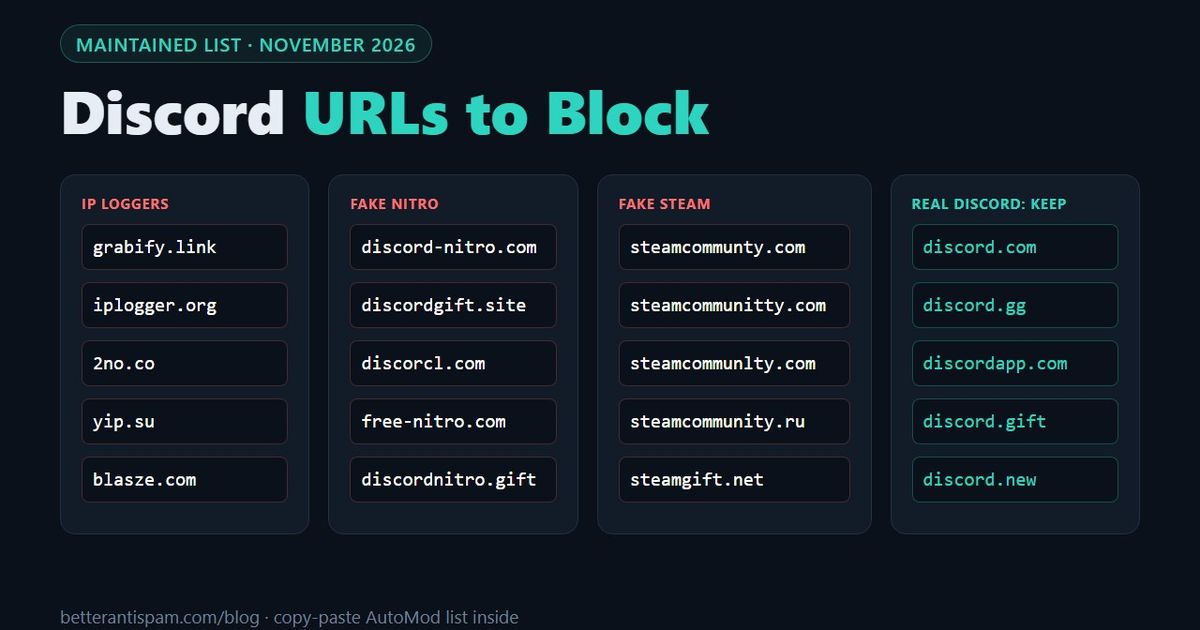
The URLs to block on a Discord server fall into three groups: IP loggers (grabify.link, iplogger.org, 2no.co, yip.su, blasze.com), fake Nitro and fake Discord domains (discord-nitro.com, discordgift.site, discorcl.com, free-nitro.com) and fake Steam domains (steamcommunty.com, steamcommunity.ru, steamgift.net). The full list is in the tables below, with a copy-paste keyword list for Discord's AutoMod. To block them automatically, add BetterAntispam and run /adblock settings (requires Administrator). Its Suspicious URLs rule deletes every domain on this list and also checks each link against a phishing blocklist database. A fixed list is never complete, because scam domains change every day, so the second half of this page covers what to do about the ones nobody has listed yet.
If you are here to block Discord itself on a school, work or home network, the URLs to block are discord.com, discord.gg, discordapp.com, discordapp.net and discord.media. That list is in the section "Discord's own domains" below.
Editorial disclosure: This guide is published by BetterAntispam. The domains below are the ones built into the bot's link filter, read from its source code. I list the limits of this approach too.
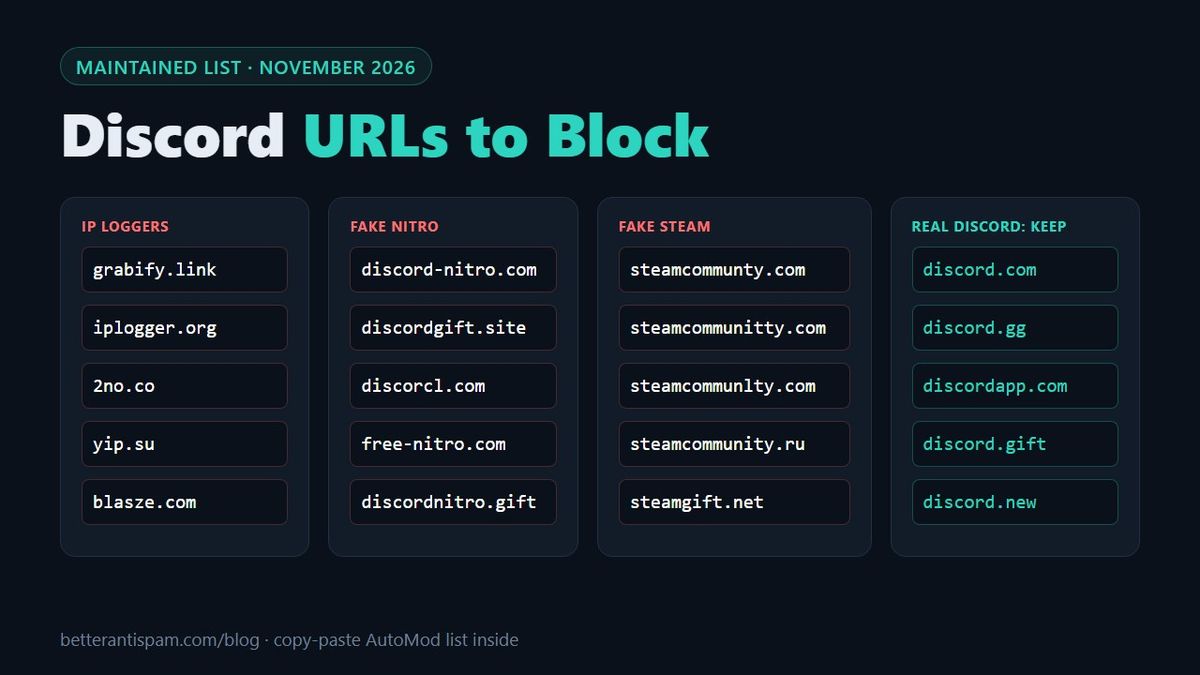
The list: Discord scam links and URLs to block
This is the list of Discord scam links, phishing links and IP grabber links that moderators block most often. Do not open these domains to test them. Every domain is written as plain text on purpose.
IP loggers and IP grabbers
An IP logger is a link that records the IP address, rough location and device of everyone who clicks it. On Discord they are used to scare people ("I have your IP") and as the first step of a targeted attack.
| Domain | Service |
|---|---|
| grabify.link | Grabify |
| grabify.org | Grabify |
| grabify.world | Grabify |
| iplogger.org | IPLogger |
| iplogger.com | IPLogger |
| iplogger.ru | IPLogger |
| iplogger.co | IPLogger |
| iplogger.info | IPLogger |
| iplogger.net | IPLogger |
| iplogger.io | IPLogger |
| 2no.co | IPLogger short domain |
| yip.su | IPLogger short domain |
| blasze.com | Blasze IP logger |
| lovebird.guru | Disguise domain used by IP loggers |
| screensharing.net | Disguise domain used by IP loggers |
| yourjavascript.com | Disguise domain used by IP loggers |
The last three matter most. Loggers offer harmless-looking domains so the link doesn't say "grabify" in it. Those services add new disguise domains often, which is one reason a list alone is not enough.
Fake Nitro and fake Discord domains
These pages copy Discord's login or gift screen. The member logs in or scans a QR code, and the attacker takes the account. The hacked account then posts the same link in every server it is in.
| Domain | What it copies |
|---|---|
| discord-nitro.com | Nitro gift page |
| discordnitro.gift | Nitro gift link (discord.gift is the real one) |
| discordgift.site | Nitro gift link |
| nitro-discord.com | Nitro gift page |
| free-nitro.com | "Free Nitro" offer |
| discorcl.com | discord.com with cl in place of d |
| discorcl.gift | discord.gift with cl in place of d |
| discord-app.com | discordapp.com with a hyphen |
Fake Steam domains
The "can you vote for my team" and "free skin" scams send people to a copy of the Steam login page.
| Domain | What it copies |
|---|---|
| steamcommunty.com | steamcommunity.com, missing an i |
| steamcommunitty.com | steamcommunity.com, double t |
| steamcommunlty.com | steamcommunity.com, l in place of i |
| steamcommunity.ru | Real name, wrong ending |
| steamgift.net | Fake Steam gift page |
Link shorteners (optional)
Shorteners are not scams, but they hide where a link goes, so scammers use them to get past domain filters. Many servers block them and ask members to post the full link. The common ones: bit.ly, tinyurl.com, t.co, goo.gl, is.gd, ow.ly, rb.gy, cutt.ly, shorturl.at, t.ly, tiny.cc, rebrand.ly, v.gd, shorte.st, adf.ly, ouo.io, bc.vc.
This is your choice. If your community shares a lot of news or shopping links, blocking shorteners will delete normal messages.
Discord's own domains
These domains belong to Discord. What you do with them depends on why you are here.
| Domain | Used for |
|---|---|
| discord.com | The website, the app, message links, invites |
| discord.gg | Invite links and the connection the app keeps open |
| discordapp.com | Older app and invite links, attachments on cdn.discordapp.com |
| discordapp.net | Images and media on media.discordapp.net |
| discord.media | Voice and video |
| discord.gift | Real Nitro gift links |
| discord.new | Server templates |
| discordstatus.com | Status page |
| discordactivities.com | Activities |
If you moderate a server: do not block these
A filter that is too broad deletes Discord's own links. A keyword such as *discord* blocks every invite and every message link. Keep the domains above out of your block list.
The quick test for members: find the first single slash after https://, then read backwards from it. The last two parts before that slash are the real domain. discord.com.free-nitro.ru/login is on free-nitro.ru, not on discord.com.
If you want to block Discord on a network: block these
To block Discord on a router, firewall, DNS filter or Pi-hole, block the first five domains in the table and all of their subdomains: discord.com, discord.gg, discordapp.com, discordapp.net and discord.media. Blocking only discord.com is not enough, because the desktop and mobile apps also connect to the others.
On a single computer you can use the hosts file:
0.0.0.0 discord.com
0.0.0.0 www.discord.com
0.0.0.0 discord.gg
0.0.0.0 gateway.discord.gg
0.0.0.0 discordapp.com
0.0.0.0 cdn.discordapp.com
0.0.0.0 discordapp.net
0.0.0.0 media.discordapp.net
0.0.0.0 discord.media
A hosts file has no wildcards, so it only blocks the exact names you list. A DNS filter or a router rule that blocks the whole domain is more complete. None of these stop someone who uses a VPN or mobile data.
How to block URLs with AutoMod (no bot)
Discord's AutoMod can block these without any bot. You need Manage Server.
- Open Server Settings → AutoMod.
- Under Custom Keyword Rule, press Set Up.
- Paste the list below into the keywords box.
- Set the response to Block message and Send alert to a staff channel.
- Exempt your moderator roles and save.
*grabify*, *iplogger*, *2no.co*, *yip.su*, *blasze*, *lovebird.guru*, *screensharing.net*, *yourjavascript.com*, *discord-nitro*, *discordnitro*, *discordgift*, *nitro-discord*, *free-nitro*, *discorcl*, *discord-app.com*, *steamcommunty*, *steamcommunitty*, *steamcommunlty*, *steamcommunity.ru*, *steamgift*The * on both sides makes AutoMod match the text inside a longer link. Each rule holds up to 1,000 keywords of up to 60 characters, according to Discord's AutoMod developer documentation. The setup steps are in Discord's AutoMod FAQ.
For domains that are not on any list yet, add a regex pattern to the same rule. Discord's regex filter allows up to 10 patterns per rule, each up to 260 characters. This one catches new fake Nitro domains by their shape:
(free|discord|discorcl|dlscord)[-_.]?nitro[-a-z]*\.[a-z]{2,}It matches discord-nitro.com, free-nitro.xyz and discordnitro.gift, but not discord.com/nitro. I tested it in the Rust regex engine, which is the regex flavor AutoMod uses. Run a new pattern on Send alert only for a day before you let it block messages. More rules to copy: four AutoMod rules and the AutoMod setup guide.
AutoMod has three limits here. It only knows the keywords you typed. You have to update them by hand. And members with Administrator or Manage Server are always exempt from AutoMod, so it will not stop a hacked admin account.
Community servers also get help from Discord itself. Discord's safety update describes a suspicious link filter that automatically blocks messages with links verified to be harmful, such as phishing links. It only covers links Discord has already verified.
How to block URLs with BetterAntispam
/adblock settings (requires Administrator) opens the link filter. It is off until you turn it on. Once it is on, three rules are active by default:
| Rule in the panel | What it deletes | On by default |
|---|---|---|
| Discord invites | Invite links to other servers | Yes |
| Short links | bit.ly, tinyurl.com and the other shorteners | Yes |
| Suspicious URLs | Every domain in the tables above, plus domains flagged by a phishing blocklist database | Yes |
| Any link | Every link except allowed domains | No |
| Trusted links only | Everything except Tenor, Giphy, Discord media and domains you add | No |
| Plain-text links | Domains typed without https:// | No |
Three details that matter:
- Subdomains count.
login.grabify.linkis blocked becausegrabify.linkis. - Plain text counts. For the Suspicious URLs and Short links rules,
grabify.link/abctyped withouthttps://is still caught. - Discord's own domains are never flagged by the Suspicious URLs rule.
When a link is blocked, the bot deletes the message and posts a short notice. By default the first blocked link also triggers the punishment, which is a timeout. Under Limits · thresholds you can raise the number of strikes, or set it to 0 so the bot only deletes. Strikes are counted over 10 minutes.
Members with Manage Messages are skipped, and so is anyone on the Whitelist page. To let members post links to your own site while Any link or Trusted links only is on, press Set allowed domains and add it. Send the log to a staff channel with /logging settings (Administrator).
Honest limits: the bot deletes the message after it is posted, so a fast reader can still see it for a moment. AutoMod blocks before the message appears. Use both. And if the bot's role is below the member's highest role, the delete works but the timeout does not.
Product page: ad-block. The link filter is free.
Why a list is never enough
A new domain is cheap to register, and scammers replace theirs constantly. Community lists such as discord-phishing-links list more than 21,000 domains, and that project is now in maintenance mode. No moderator can keep up by hand. Use layers:
| Layer | What it catches | Tool |
|---|---|---|
| Static list | Known loggers and old scam domains | AutoMod keywords, /adblock settings |
| Pattern | New domains with "nitro" or a Discord typo in the name | AutoMod regex |
| Blocklist lookup | Domains reported in the last days | Suspicious URLs in /adblock settings |
| Allowlist | Everything you have not approved | Trusted links only |
| Trap | The hacked account that posts in every channel | /honeypot settings (Manage Server) |
| Gate | Scripted accounts that join to spam | /verification settings (Administrator) |
The allowlist is the only layer that stops a domain registered an hour ago. It suits announcement-heavy servers and is too strict for most chat servers. A middle option is to turn it on only for members without a trusted role, using the Whitelist page.
Most scam links come from hacked accounts of real members, not from strangers. A honeypot channel catches those on their first message. For accounts that join only to spam, see how to secure your Discord server from bots.
How to check a link before you add it to the list
Never open a suspicious link to see what it does. Paste it into a scanner instead:
- VirusTotal checks the URL against dozens of security vendors.
- urlscan.io loads the page for you and shows a screenshot and where it redirects.
- Google Safe Browsing shows whether Google has flagged the site.
Then ask three questions. Is the domain a misspelling of a real one? Does the page ask for a login, a QR scan or a download? Did the member who posted it post the same thing in several channels? One yes is enough to block it.
If a member already clicked and logged in, send them to what to do if you're hacked on Discord. Discord's own advice is in Tips against spam and hacking and Protecting users from scams.
How this list is maintained
The tables match the domains built into BetterAntispam's link filter. When a domain is added to the bot, it is added here. The date in the summary at the top shows the last update. To report a domain, post it as plain text, not as a clickable link, in the support server.
FAQ
What URLs should I block on Discord?
Block IP loggers (grabify.link, iplogger.org, 2no.co, yip.su, blasze.com), fake Nitro domains (discord-nitro.com, discordgift.site, discorcl.com, free-nitro.com) and fake Steam domains (steamcommunty.com, steamcommunity.ru). Many servers also block link shorteners such as bit.ly.
Can a Discord link grab my IP address?
Not a link to Discord itself. A link to an IP logger such as Grabify records the IP address of anyone who opens it in a browser. An IP address shows a rough location and internet provider, not a home address. It cannot be used to hack your Discord account.
What URLs do I block to block Discord on my network?
Block discord.com, discord.gg, discordapp.com, discordapp.net and discord.media, including their subdomains. Use a DNS filter or router rule where you can, because a hosts file cannot block subdomains with a wildcard.
How do I block links on Discord without a bot?
Open Server Settings → AutoMod, press Set Up under Custom Keyword Rule, paste the domains with a * on each side, and set the response to Block message. You need the Manage Server permission.
Does Discord block scam links on its own?
Partly. Community servers have a suspicious link filter that blocks messages with links Discord has verified as harmful, and AutoMod's Block Spam Content rule catches some scam messages. Neither catches every new domain, which is why servers add their own keyword rule or a bot.
Is grabify.link illegal or against Discord's rules?
The service itself is a legal website. Tricking people into clicking a logger to collect their data is against the rules of most servers, and Discord can act on accounts that use deceptive links. Whether it is illegal depends on your country and on what is done with the data.
How do I block all links except my own?
In BetterAntispam, run /adblock settings, turn on Trusted links only, then press Set allowed domains and add your domains. Tenor, Giphy and Discord's own media links stay allowed.
How often does this list change?
The list is checked when BetterAntispam's built-in domain list changes, and the date at the top of the page shows the last update. New scam domains appear daily, so use the list together with a pattern rule and a blocklist lookup.
Core is free · Setup in Discord
Ready to protect your server?
Invite BetterAntispam. Core antiraid, antispam, and antinuke are free. Configuration is slash commands inside Discord.