

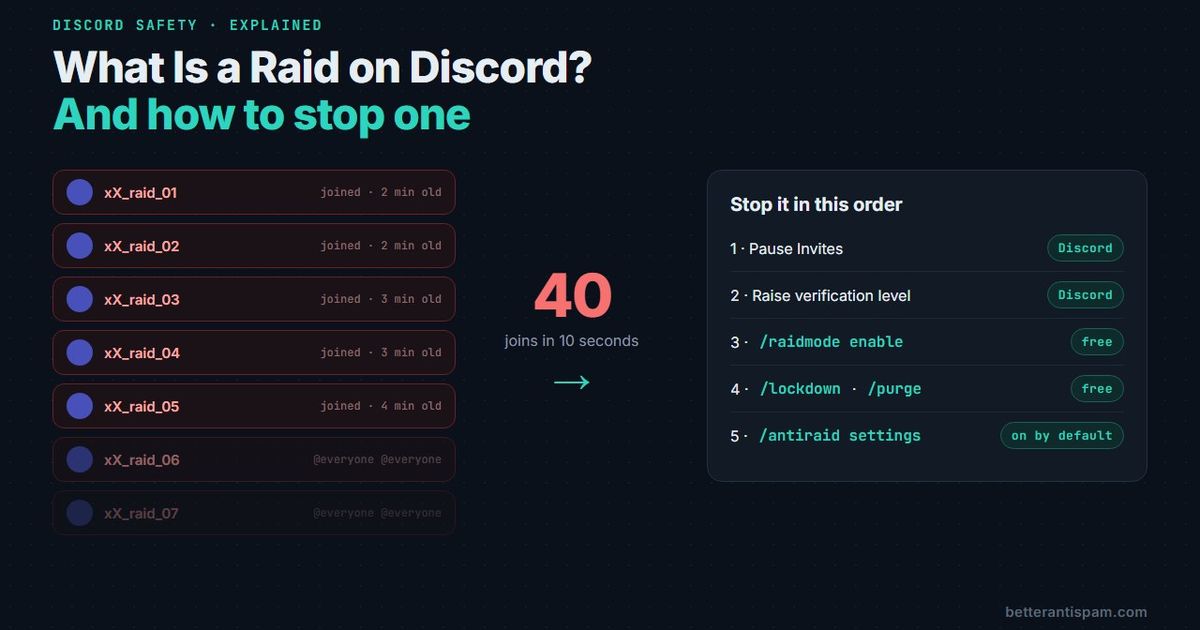
A raid on Discord is when a large group of accounts joins a server at almost the same moment to disrupt it. Usually that means mass pings, the same message pasted in every channel, scam links, or shock images. The accounts are mostly throwaways or bots, and the whole thing is planned somewhere else and pointed at your invite link. Discord defines it the same way: “a large number of users or bots join a server at once for disruptive or malicious intents,” and raiding breaks its rules. To stop one, pause your invites first, then lock channels and remove the accounts. A bot like BetterAntispam can do the removal for you with /raidmode enable.
Editorial disclosure: This guide is published by BetterAntispam. Discord’s own tools are listed first because they are free and they work. Bot thresholds and defaults below come from BetterAntispam’s source code, not its marketing.
What does raiding mean on Discord?
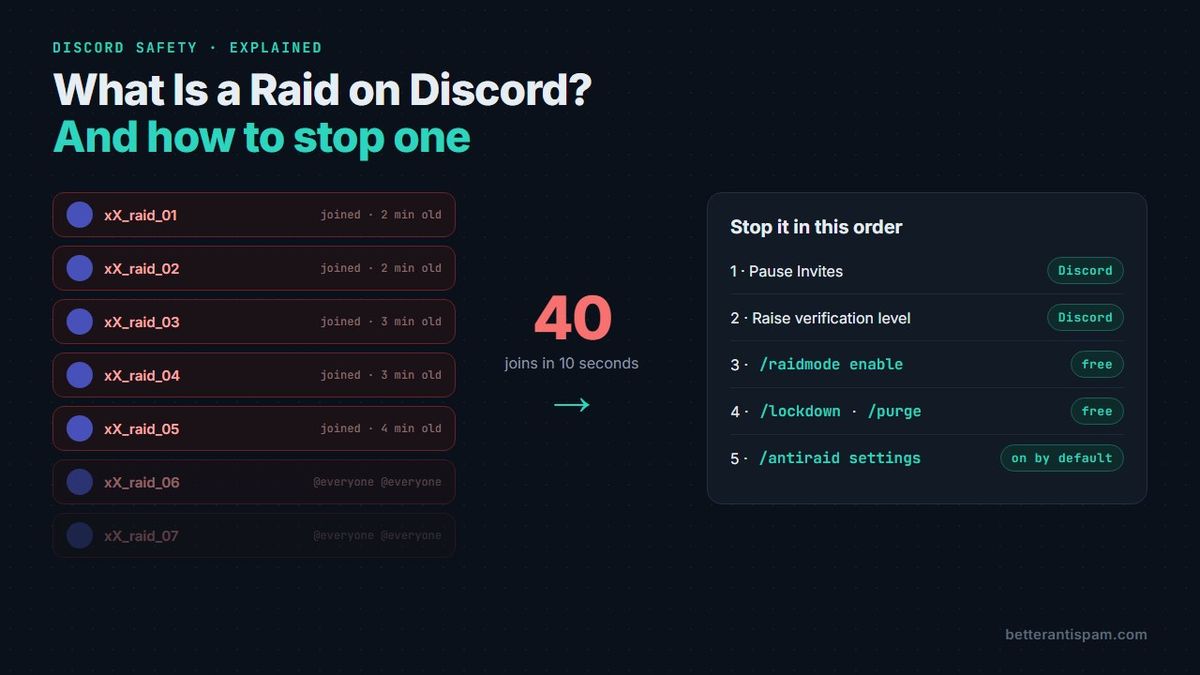
Raiding means sending a crowd of accounts into someone else’s server to wreck it for a while. The point is the crowd. One troll is a moderation problem. Forty accounts in ten seconds is a raid, because no moderator can type /ban that fast.
A raid has three parts:
- An organiser. Someone picks the target and shares the invite, usually in a separate “raid server”, a group chat, or a forum thread.
- The accounts. Real people on alts, or scripted bot accounts and hijacked user accounts that act on command. Most are new, with no avatar and a generated name.
- The payload. What they post once inside: pings, copy-paste spam, scam links, gore or NSFW images, slurs, or loud audio in voice channels.
The word confuses people because it means other things elsewhere. A Twitch raid sends a streamer’s viewers to another channel as a friendly gesture. A raid in Destiny, World of Warcraft or Fortnite is group content, and plenty of Discord servers exist to organise those. When moderators say “we got raided”, they mean the hostile kind.
What do Discord raiders actually do?
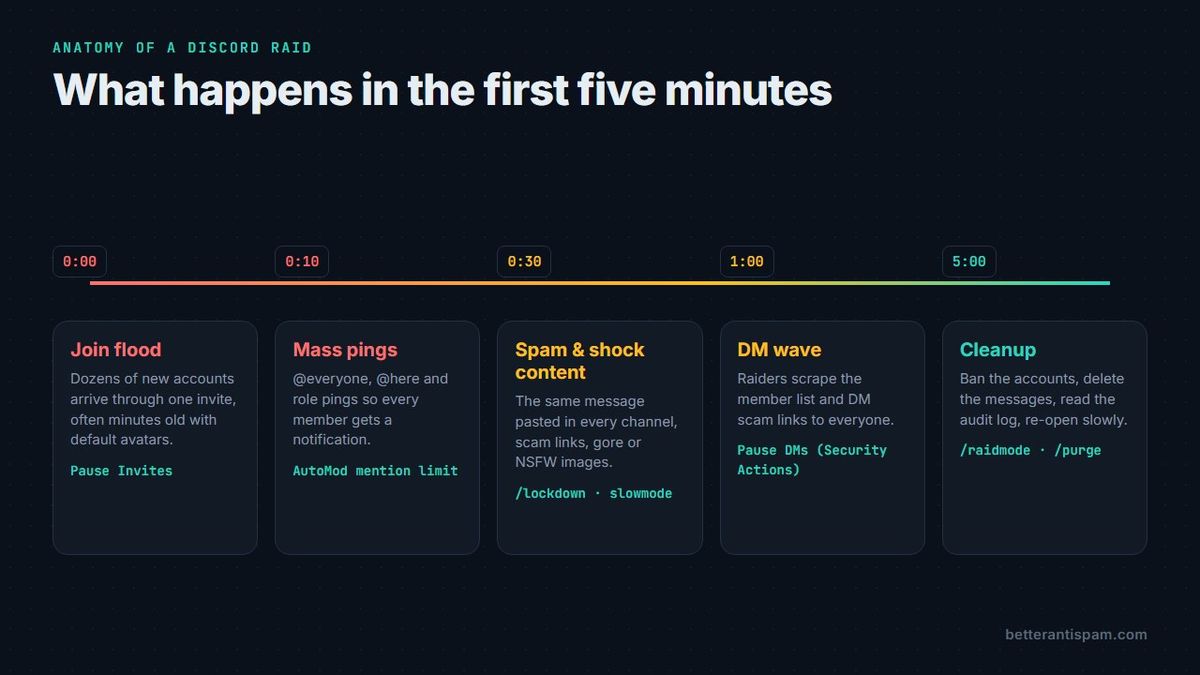
Most raids are one of five kinds, and the big ones mix several.
| Type of raid | What you see | First thing to turn on |
|---|---|---|
| Join raid | Dozens of accounts join in seconds, often through one invite | Pause Invites, then an anti-raid bot |
| Mention (ping) raid | @everyone, @here, role and user pings in every channel | AutoMod Block Mention Spam; turn off @everyone for normal roles |
| Spam raid | The same message, link or wall of text pasted everywhere | Slowmode, lock the channel, an antispam filter |
| Shock raid | Gore, NSFW or flashing images meant to make members leave | Explicit Media Content Filter on Medium or High |
| DM raid | Raiders read the member list and DM scam links or abuse to everyone | Pause DMs in Security Actions |
Voice raids happen too: accounts pile into a voice channel and blast noise. Lock the channel or move it to a role that new members do not have.
Why do people raid? Mostly for the reaction. Some raids push a scam, a crypto “giveaway”, or an advert for another server. Some are revenge for a ban. Very few are about your server personally, which is worth remembering at 2 a.m. when it feels personal.
Raid vs nuke vs spam: what is the difference?
They look alike from the member list, but they need different fixes.
- A raid comes from outside. New accounts join and cause damage with the permissions any member has. Fix: stop the joins.
- A nuke comes from inside. Someone with staff permissions (a rogue mod, a hijacked admin account, or a malicious bot) deletes channels, bans members, or creates webhooks. Raiders cannot do this, because they do not have the permissions. Fix: an anti-nuke watch on the audit log. Full recovery steps: my Discord server got nuked.
- Spam is the behaviour, not the attack. One account can spam. A raid usually contains spam. Guide: how to stop spam in Discord servers.
If channels are disappearing, you are not being raided. You are being nuked, and pausing invites will not help. Remove the staff account’s roles first.
How to tell your server is being raided
Look for these signs together. Any one alone is normal. A big streamer mentioning you, or a viral post, also brings a burst of joins.
- A burst of joins. Far more than your usual rate inside a few seconds. Your welcome channel scrolls on its own.
- Brand-new accounts. Created minutes or hours ago. Open Server Settings → Members to see account age and join method side by side.
- Look-alike names and avatars.
name_01,name_02,name_03, or all on the default avatar. - One invite code. The join method column shows the same invite for all of them.
- The same message everywhere. Identical text in several channels within seconds.
- Members DMing you about DMs. “Did someone just message the whole server?” is often your first warning of a DM raid.
How to stop a Discord raid that is happening now
Work in this order. Closing the door comes before cleaning the room, because every second the invite stays open, more accounts walk in.
- Pause Invites. Server Settings → Invites → Pause Invites, or use Security Actions from the server name dropdown. This stops every new join without deleting your invite links. Discord’s Pause Invites FAQ covers it. Security Actions can also pause DMs between members who are not friends, which kills a DM raid (Activity Alerts and Security Actions).
- Raise the verification level. Server Settings → Safety Setup → Verification Level. High makes new members wait 10 minutes before they can talk. Highest needs a verified phone number. Verification levels explains each one, and my verification level guide says which to use when.
- Lock or slow the busy channels. Turn on slowmode, or lock the channel so only staff can type. With BetterAntispam that is
/lockdown(Administrator) or/slowmode(Manage Channels). Steps for doing it by hand: how to lock a Discord channel. - Remove the accounts. Ban them, and tick the option to delete their recent messages so the spam goes too. Doing this one by one is slow.
/raidmode enable(Administrator) punishes every new joiner until you turn it off. The default is kick,punishmentcan be ban or mute, andenable_afterturns it off by itself once nobody has joined for a set time (for example10m)./raidmode disableends it. - Clean up. Delete what is left with
/purge(Administrator, up to 1000 messages per run). Discord only bulk-deletes messages under 14 days old, which is fine for a raid that started minutes ago. More: the Discord purge command. - Report it. On a Community server, staff with Kick or Ban Members can use Report Raid from the server menu on desktop. Then reopen invites slowly and watch the join log for a second wave.
The minute-by-minute version, with what to say to your members, is in how to stop a Discord raid.
How to protect your server from the next raid
Prevention is cheaper than cleanup. Discord’s own Raids 101 is a good list, and I would do these in this order.
Use Discord’s free tools first
- Turn off
@everyoneand@herefor normal roles. Server Settings → Roles → each non-staff role → turn off Mention @everyone, @here, and All Roles. This one switch takes the worst part out of a ping raid. - AutoMod. Turn on Block Mention Spam with a limit that suits your server, plus a custom keyword rule for phrases raiders have used on you before. AutoMod FAQ, and my AutoMod setup guide.
- Raid Protection. Server Settings → Safety Setup → Raid Protection. Discord uses machine learning to spot join raids, alerts a channel you pick, and asks new joiners for a CAPTCHA for the next hour. Discord says it is still rolling out to Community servers, so you may not have it yet.
- Explicit Media Content Filter on Medium or High, so shock images get blocked before anyone sees them.
- A real moderator online in every time zone you can manage. A raid at 4 a.m. with nobody awake does far more damage than the same raid at 8 p.m.
Add an anti-raid bot for the gaps
Discord’s tools leave two gaps. Raid Protection is not on every server yet, and nothing native removes the accounts for you. That is the job of an anti-raid bot.
Add BetterAntispam (you need Manage Server to invite it), run /setup, then /antiraid settings (Administrator). Anti-raid is on by default. Here is what it does out of the box:
Join-wave detection scales with your server size. It uses two lines. The lower one only acts if the wave also looks fake: new accounts, matching names, the same invite. The higher one acts on any wave.
| Server size | Watch line | Always a raid | Window |
|---|---|---|---|
| Up to 50 members | 3 joins | 5 joins | 10 seconds |
| Up to 250 | 4 | 7 | 10 seconds |
| Up to 1,000 | 6 | 10 | 10 seconds |
| Up to 5,000 | 10 | 15 | 10 seconds |
| Up to 10,000 | 15 | 25 | 10 seconds |
| Up to 25,000 | 20 | 35 | 10 seconds |
| Up to 50,000 | 30 | 50 | 12 seconds |
| Up to 100,000 | 50 | 75 | 12 seconds |
| Bigger | 100 | 150 | 15 seconds |
Those are the Balanced numbers. Strict lowers both the count and the window, and Lenient raises them. The rest of the defaults:
- The default action is quarantine. The accounts are held aside instead of kicked, so a false alarm costs nothing. You can switch to kick, ban, a 10-minute mute, or a CAPTCHA (default 120 seconds to solve, 10–600).
- Raid phrases and invite links in profiles are checked as accounts join.
- A minimum account age is off by default. Set it under the age limits in
/antiraid settings, from 1 hour to 7 days. I use 24 hours on public servers.
The core is free. Similar-name detection and custom suspicion weights are part of Shield, the paid tier, sold in the Discord app store. For a gate on every new member, not just suspected raiders, add /verification settings. My comparison of the options is in Discord captcha bots. For a trap channel that catches raid bots that post everywhere, see how to make a honeypot channel.
What an anti-raid bot will not catch
I would rather tell you this now than after a bad night.
- Slow raids. Join-wave detection counts joins inside a window of seconds. Thirty accounts that join one every twenty seconds never trip it. A minimum account age is the backstop, because it checks every account no matter the pace.
- A bot below the accounts it should punish. If BetterAntispam’s role sits under the role new members get, its kicks and bans fail, and anti-raid does not post an error when that happens. Drag the bot’s role near the top of the role list, and run
/scanto check. - Real growth spikes. A big creator sharing your invite looks exactly like a raid. Switch to Lenient before a planned event, or watch the log.
- A nuke. Anti-raid watches joins, not staff. Pair it with
/antinuke settings. The full lineup is in the best Discord anti-raid bots.
FAQ
What is a raid on Discord?
A raid is when a large number of accounts join a server at about the same time to disrupt it with spam, mass pings, scams, or shock content. It is organised outside the server and is against Discord’s rules.
Is raiding a Discord server against the rules?
Yes. Discord’s Raids 101 page says raiding is against its Terms of Service and its Community Guidelines. Accounts that raid can be actioned by Discord, so report raids even after you have cleaned up.
What is a raid server on Discord?
A server set up to plan raids. Members share target invites and pick a time, and sometimes bot accounts are run from there. It is also, confusingly, the name for a server that organises raids in games like Destiny, which has nothing to do with attacking other servers.
How do raiders find my server?
Through any invite link that is public: a server listing site, a link in a YouTube description, a TikTok bio, or a link one of your members posted elsewhere. Use invites that expire, and track which invite each wave used in Server Settings → Members.
Can you stop a raid without a bot?
Yes. Pause Invites, raise the verification level, lock the busy channels, and ban the accounts by hand. A bot only makes the banning faster and catches the next one before you notice.
What is the difference between a raid and a nuke?
A raid is outsiders joining and spamming. A nuke is someone with staff permissions deleting channels, roles, or members. Raids are stopped at the door, and nukes are stopped by limiting who holds powerful permissions.
Should I delete my invite link during a raid?
No. Pause invites instead. Deleting a link breaks it for every real member who has it saved, and raiders can be handed a new link in seconds anyway.
The short version
A raid is a crowd, not a person. Pause Invites the moment you see one, then lock, remove, and clean. Before the next one, turn off @everyone for normal roles, turn on AutoMod’s mention limit and Raid Protection, and let an anti-raid bot handle the accounts. BetterAntispam’s anti-raid is free and already on when you invite it.
Sources
Core is free · Setup in Discord
Ready to protect your server?
Invite BetterAntispam. Core antiraid, antispam, and antinuke are free. Configuration is slash commands inside Discord.