
How to Lock a Discord Channel
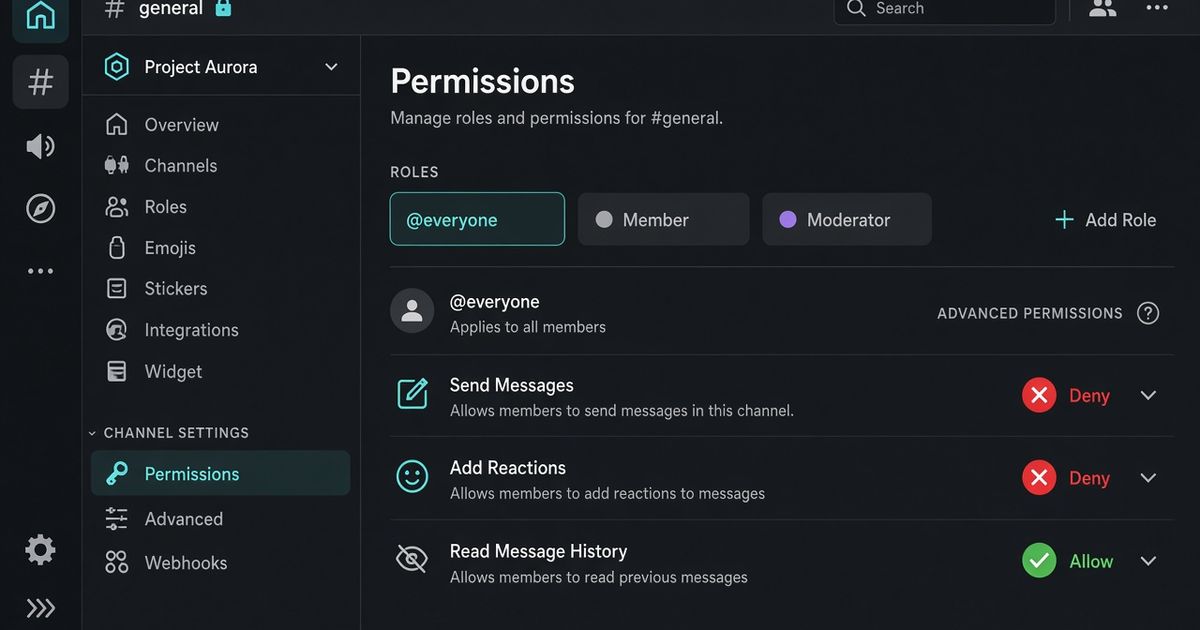
To lock a Discord channel, open Edit Channel, go to Permissions, select @everyone, and set Send Messages to the red X. Save. On mobile, long-press the channel, tap Edit Channel, then Permissions, and deny Send Messages the same way. The channel stays visible. Members can still read. They cannot post. BetterAntispam does not replace that screen. Run /lockdown (Administrator) when you want the same lock from a slash command and an unlock that restores the previous overwrites.
Editorial disclosure: This guide is published by BetterAntispam. We recommend BetterAntispam when you want Discord’s native channel lock plus a slash-command snapshot you can undo, with raid and spam tools in the same stack. We name the cases where Discord’s own Permissions tab, Dyno, Carl-bot, Wick, YAGPDB, MEE6, or ProBot already cover the job. Channel permission rules come from Discord. Command options come from the bot’s source.
TL;DR: People searching how to lock a discord channel, lock discord channel, discord lock channel, how to lock a channel on discord, lock discord channel mobile, and discord lockdown command want a read-only channel, not a hidden one and not slowmode. Native path: Edit Channel → Permissions → @everyone → deny Send Messages. You need permission to edit that channel. Administrator still talks. A role with Send Messages allowed on that channel still talks. Threads are a separate permission. For a command, invite BetterAntispam and run/lockdown(Administrator). Single-channel lock is free.all/unlockallare Shield./serverlockstops joins, not chat./slowmodeonly adds a cooldown.
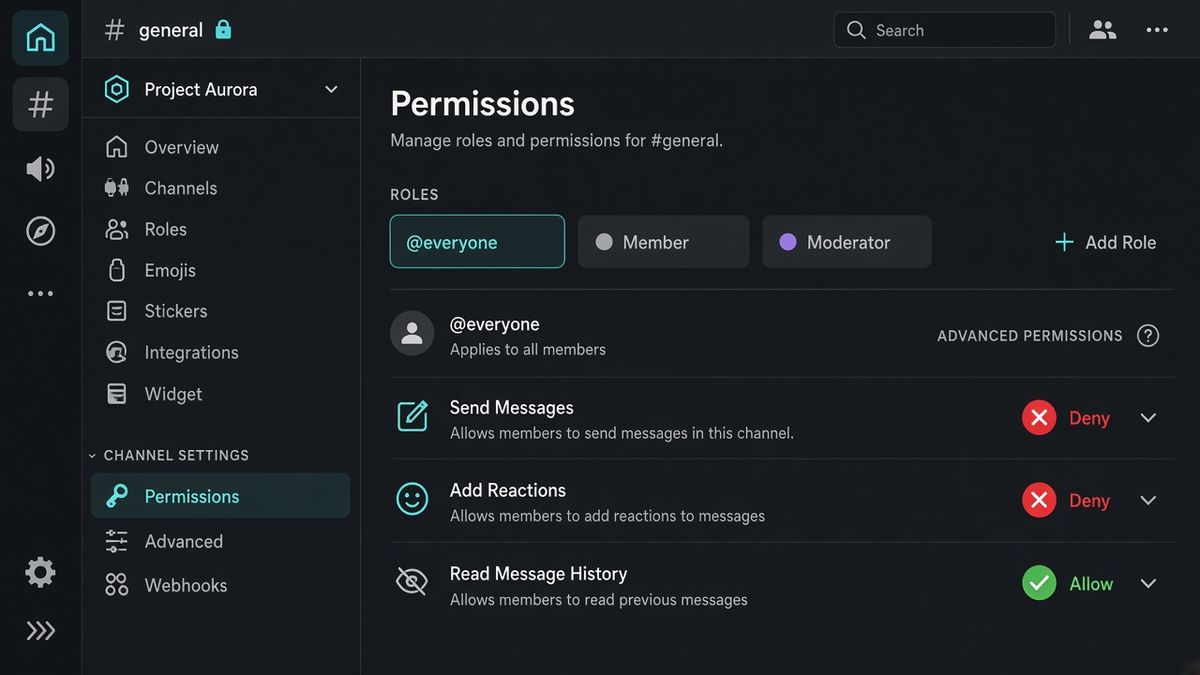
Lock it in Discord, then with /lockdown
This is the first body section: Discord’s screen, then the command.
Desktop or browser
- Hover the channel. Click the cog (Edit Channel). Or right-click the channel → Edit Channel.
- Open Permissions. Discord’s Permissions FAQ is the official page: channel overwrites beat server roles.
- Select @everyone.
- Set Send Messages to the red X (Deny). Neutral gray inherits the server role. Green allows. Red denies.
- If you also want the room quiet, deny Add Reactions. Discord’s permission list treats Send Messages in Threads as a different bit. Deny that too if old threads should stop taking replies.
- Save. Ask a normal member, or use View Server As Role, before you walk away.
Mobile
- Long-press the channel → Edit Channel.
- Open Permissions. Switch to Advanced if you only see the Private Channel toggle. Private is hide, not lock.
- Tap @everyone. Deny Send Messages.
- Save.
You need Manage Channels on that channel, or Administrator. The server owner always can.
Add BetterAntispam, stand in the channel, and run /lockdown (Administrator). The bot needs Manage Channels there. The command used in a live incident is:
/lockdown channel channel:#general reason:raid
/lockdown unlock channel:#general
/lockdown denies Send Messages and Add Reactions to @everyone and snapshots the previous overwrites. Unlock puts those overwrites back. It does not hide the channel. It does not change the server verification level. Locking every channel at once (all) and unlocking them all (unlockall) are Shield. One channel is free.
Docs: customer documentation. Support: Discord support server. There is no website login for this. Configuration stays in the slash-command panel. The feature page is Discord lockdown.
What locking a channel actually does
A locked channel is read-only for people who inherit @everyone. It is not a mute, not a timeout, not slowmode, and not a private channel.
| You wanted | What a lock does | What it does not do |
|---|---|---|
| Stop chat in #general | Deny Send Messages on @everyone | Hide the channel |
| Keep staff updates going | Staff with an Allow overwrite still post | Silence Administrator |
| Pause a fight | New messages stop | Delete the last 200 lines |
| Stop a raid | Buy time in one room | Stop joins or other channels |
| Make #rules read-only | Same deny, left on permanently | Turn it into an Announcement channel |
Pinned messages stay. History stays. Members who already have the channel open still see it.
Announcement channels are a different type, Community servers only. You still deny Send Messages there if only staff should publish.
To hide a channel, deny View Channel. That is a private channel. People searching “lock” usually want read-only, not invisible.
Why someone can still type
Administrator bypasses channel overwrites. Discord says so in the roles and permissions article. If a helper has Administrator, a lock will not stop them. Cut that grant if they do not need it.
A role or member overwrite with Send Messages set to Allow beats the @everyone deny for that person. After you lock, check Permissions for extra green ticks. Add your moderator role with Send Messages allowed if staff should still post updates.
Threads do not follow Send Messages. If a thread already exists, people can keep talking there until you deny Send Messages in Threads or lock the thread itself.
Bots with their own Allow overwrite, or Administrator, keep posting. Give BetterAntispam Manage Channels so unlock works. Do not strip the bot’s send permission if you want it to announce the lock.
Test with View Server As Role on a Member role, not on your owner account.
/lockdown versus /serverlock versus /raidmode
These three get mixed up every raid night. They do different jobs.
| Command | What it stops | Reverse with | Plan |
|---|---|---|---|
| /lockdown | Posting in one channel | /lockdown unlock | Free |
| /lockdown all | Posting in every channel | unlockall | Shield |
| /serverlock | New joins, if auto-kick, auto-ban, or a password is on | /serverlock disable | Password is Shield |
| /raidmode enable | Every new join, no scoring | /raidmode disable | Free |
| /slowmode | How often one person can send | /slowmode off | Free |
| /antiraid settings | Join-rate and suspicion | Turn the toggles off | Automatic lockdown is an action |
/serverlock (Administrator) is not a channel lock. On its own it sets a flag. New members are only removed if you also turn on auto-kick or auto-ban, or you set a password. Password mode is Shield. Discord’s Pause Invites is the free “nobody new gets in” switch.
/raidmode enable (Administrator) punishes every new join. Default punishment is kick, or ban/mute, with optional enable_after and dm_members. It lives in memory. If the bot restarts, raid mode comes back off.
/antiraid settings (Administrator) can list automatic lockdown as an action when join rate trips. That is a join-wave tool. It is not a replacement for locking the channel people are already typing in. The raid playbook is How to Stop a Discord Raid.
Lock versus slowmode versus cleanup
Use the smallest tool that matches the night.
Slowmode when the room should stay open. /slowmode (Manage Channels) sets Discord’s per-person cooldown, 0–21600 seconds. The slider how-to is How to Use Discord Slowmode.
Lock when you do not want anyone without an overwrite posting. That is /lockdown or the Permissions tab.
Purge or nuke after the flood already landed. /purge and /nuke (Administrator) take at most 1000 messages. Discord’s bulk-delete API only covers messages under 14 days old. Guide: How to Use the Discord Purge Command.
Lock first if they are still typing. Then clean. Then unlock when staff have a statement ready.
Voice channels and categories
A text lock does not mute voice.
To lock a voice channel in Discord: Edit Channel → Permissions → @everyone → deny Speak (they stay connected, silent) or deny Connect (they cannot join). You need Manage Channels or Administrator.
To lock a category: right-click the category → Edit Category → Permissions → deny Send Messages on @everyone. Synced channels under it follow. Channels marked not-synced do not. Discord’s Permissions FAQ covers sync.
/lockdown as documented locks a text channel’s Send Messages and Add Reactions. Do not assume it flips Speak or Connect.
Other bots that already lock channels
Keep the one you already trained staff on.
| Tool | How it locks | Notes |
|---|---|---|
| Discord Permissions | Deny Send Messages on @everyone | Always there. No bot required |
| BetterAntispam | /lockdown, unlock restores the snapshot | Free for one channel. all / unlockall are Shield |
| Wick | Panic / lockdown in the security suite | Keep Wick if restore after a wipe is why you opened this tab |
| Dyno / Carl-bot / YAGPDB | Dashboard or prefix lock commands | Use them if that is already muscle memory |
| MEE6 | Moderator tools on the dashboard | Keep if XP already lives there |
| ProBot | Automod stack | Not why you searched this page |
Do not run two bots fighting over the same @everyone overwrite. Unlock from the bot that locked it, or you will flatten a snapshot you still need.
Which tool should you use?
Discord’s Permissions tab if you are locking #rules or #announcements for good. No bot. One save.
BetterAntispam if you want /lockdown during a bad night, a restore on unlock, plus /antiraid settings, /raidmode, /antispam settings, and /slowmode without a website login.
Wick if a compromised moderator deleting channels is the nightmare, and you will finish Wick’s setup.
Dyno, Carl-bot, or YAGPDB if staff already type that lock command in their sleep.
MEE6 or ProBot if that dashboard already owns the server and you will not move it.
Do not install a second lockdown bot to “be safe.” One overwrite is enough.
FAQ
How do I lock a Discord channel?
Edit Channel → Permissions → @everyone → deny Send Messages → Save. Mobile: long-press the channel → Edit Channel → Permissions. Or run /lockdown (Administrator).
How do I unlock a Discord channel?
Set Send Messages on @everyone back to gray (inherit), or green if that channel should stay open for everyone. Or run /lockdown unlock. Unlock restores the snapshot /lockdown saved. It does not invent a new overwrite.
How do I lock a Discord channel on mobile?
Long-press the channel, Edit Channel, Permissions, @everyone, deny Send Messages. If you only see Private Channel, that toggle hides the channel. Use Advanced permissions for a read-only lock.
What permission do I need to lock a Discord channel?
Manage Channels on that channel, or Administrator. /lockdown requires Administrator for the person running it. The bot needs Manage Channels on the channel.
Why can people still talk after I locked the channel?
They have Administrator, a Send Messages Allow overwrite, or they are in a thread. Deny Send Messages in Threads, or lock the thread. Test with View Server As Role.
Does locking a channel hide it?
No. Deny View Channel to hide it. A lock leaves the channel visible and read-only.
Will /lockdown stop a raid?
It stops posting in that channel. Joins continue. Other channels stay open unless you lock them too, or you are on Shield and run all. Pause invites or use /serverlock to close the door. Use /raidmode enable when every new join should be punished.
Is lock-all free?
No. all and unlockall are Shield. Single-channel /lockdown is free. Upgrade: Shield in the application store.
Final Verdict
How to lock a Discord channel is a permission change, not a plugin. Edit Channel, Permissions, @everyone, deny Send Messages, Save. Grant staff an Allow overwrite if they must still talk. Invite BetterAntispam and run /lockdown when you need that lock in one command and a clean unlock. Use /slowmode when the room should stay open. Use /raidmode and Pause Invites when the problem is joins. Keep Wick or Dyno if they already own that job.
— Adam
More guides
- Discord lockdown
- How to Stop a Discord Raid (2026 Playbook)
- How to Use Discord Slowmode
- How to Use the Discord Purge Command
- Best Discord Anti Raid Bot in 2026
- Setting Up Permissions FAQ – Discord
- How to Protect Your Server from Raids 101 – Discord
Sources
- Setting Up Permissions FAQ – Discord
- Discord Roles and Permissions
- Permissions – Discord API
- Announcement Channel FAQ – Discord
- How to Protect Your Server from Raids 101 – Discord
- Pause Invites FAQ – Discord
- Slowmode FAQ – Discord
- What is Wick – Wick Docs
- Wick Setup – Wick Docs
- Understanding MEE6 Services
- BetterAntispam documentation
- BetterAntispam lockdown
- BetterAntispam application store (Shield)




















































