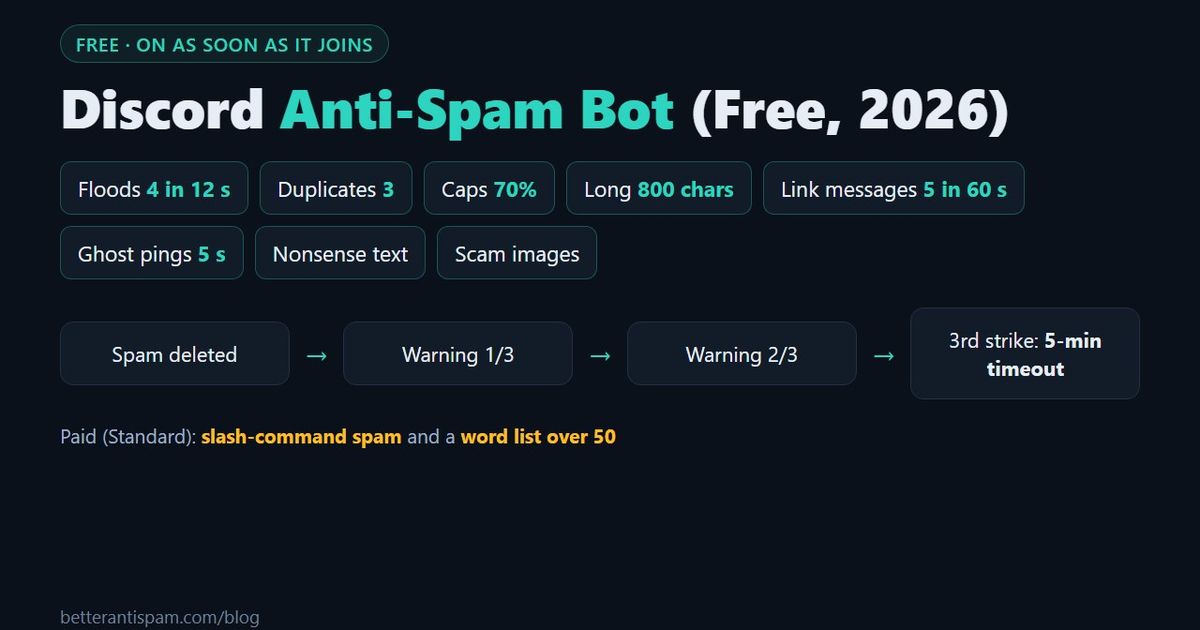
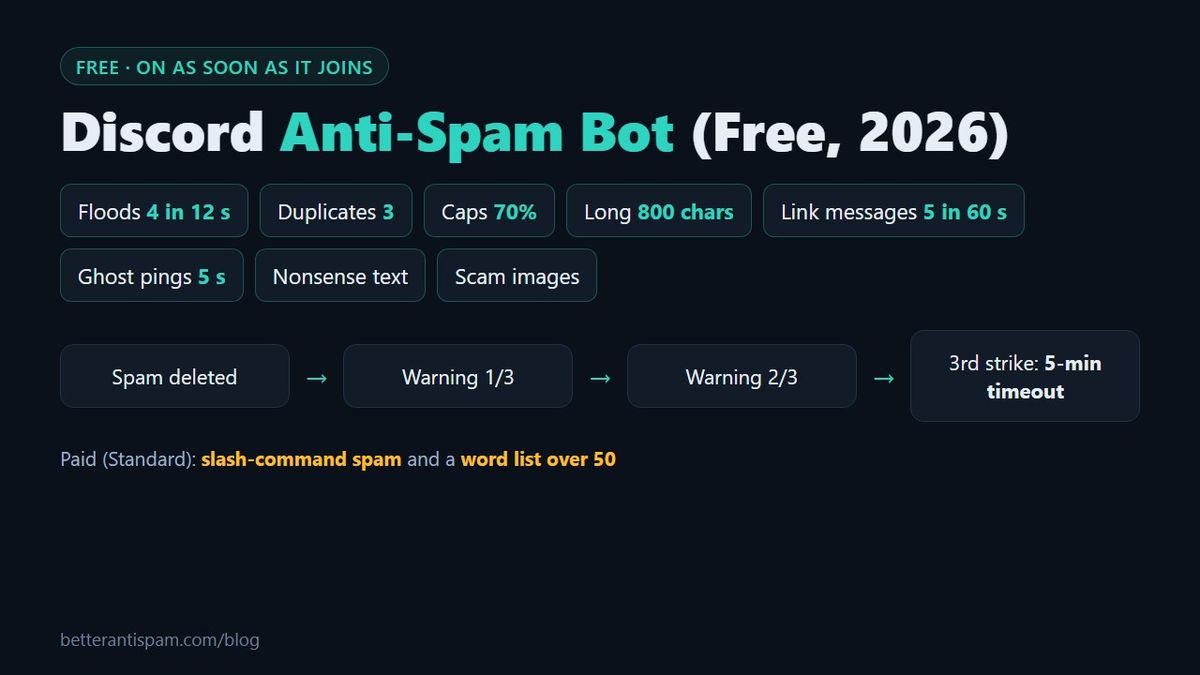
BetterAntispam is a free Discord anti-spam bot. Anti-spam is on as soon as the bot joins your server, with no website and no setup required. Out of the box it catches message floods (4 messages in 12 seconds), duplicate messages, all-caps, very long messages, nonsense text, ghost pings, link spam and known scam images. It deletes the spam, warns the member twice, and on the third strike times them out for 5 minutes. To change anything, run /antispam settings (requires Manage Server). The cheapest paid plan adds only two things to anti-spam: slash-command spam detection and a word blacklist longer than 50 entries. Use it together with Discord's own AutoMod, which blocks messages before they post.
Editorial disclosure: This guide is published by BetterAntispam. Every default and limit below is taken from the bot's source code. Facts about Discord AutoMod and other bots come from their own help pages, linked in each section. We have not measured how much spam any bot catches, including ours.
What is free
| Part | Free | Paid (Standard, $4.99 a month) |
|---|---|---|
| All message detections in the table below | Yes | |
| Every limit and time window you can change | Yes | |
| Punishments: timeout, kick, ban, quarantine | Yes | |
| Trusted members, roles, channels and websites | Yes | |
| Word blacklist | Up to 50 entries | No limit |
| Slash-command spam detection | Yes | |
| A second moderator approves each punishment first | Premium plan |
Voting for the bot raises the free word list to 150 entries, or 250 with boosted vote perks. New servers also get the Premium plan free for 7 days, so the paid parts work during that time.
What it detects, and the defaults
| Detection | On by default? | Default limit |
|---|---|---|
| Message flood | Yes | 4 messages in 12 seconds |
| Duplicate messages | Yes | 3 identical messages. Very short ones trip at 2 |
| Nonsense text: repeated characters, gibberish, zalgo, many short junk lines | Yes | 4 of the same character in a row, such as aaaa, or 7 junk lines in 45 seconds |
| All caps | Yes | 70% capitals, in messages of at least 10 characters, spaces not counted |
| Very long messages | Yes | 800 characters, more for multi-line pastes |
| Ghost pings: mention someone, then delete it | Yes | Deleted within 5 seconds |
| Link spam | Yes | 5 messages with links in 60 seconds |
| Known scam images | Yes | 1 image. Punished at once, no warnings |
| Emoji spam | No | More than 10 in one message, or 30 in 15 seconds |
| Reaction spam | No | 3 reactions in 30 seconds |
| Edit spam | No | 3 edits of one message in 60 seconds |
| Spam inside embeds | No | Runs the text rules on a member's embeds too |
| Slash-command spam (paid) | No | 5 commands in 60 seconds |
You can change every limit in /antispam settings. If real members get caught, raise the duplicate limit before you touch the flood limit, because short repeated messages, such as emotes, trip the duplicate rule sooner, at 2.
Two kinds of spam are handled by other parts of the bot. Mention spam belongs to Discord AutoMod or /antiping settings, which writes Discord AutoMod rules for you. Invite and scam-link ads belong to /adblock settings (requires Manage Server). It is off when the bot joins, and /setup turns it on unless you untick it. The domains it blocks are listed in Discord URLs to block.
What happens to a spammer
- The spam message is deleted at once. A moment later the bot also deletes that member's other messages in that channel from the last minute.
- The member gets a warning in the channel, which deletes itself after a few seconds. Messages in the 12 seconds after a warning do not add another warning, so one quick burst counts once.
- On the third strike, after two warnings, the punishment lands. By default that is a 5-minute timeout. You can choose a kick, a ban, or Strip to quarantine, which removes every role and adds a quarantine role.
- The bot creates a case, sends the log channel a transcript of the deleted messages, and DMs the member. If you turned on appeals, the DM has an appeal button. See can you appeal a ban on Discord.
Warnings reset after a punishment, and after about two hours without messages. If the bot cannot act, for example because its role is below the member's role, the log says why.
Who is never punished
- The server owner, always.
- Staff with Manage Messages or Administrator, unless you switch on the Staff option to check them too.
- Members and roles on the allowlist, and ignored channels, set in
/antispam settingsor for every module in/whitelist settings(requires Administrator). - Other bots. Messages from bots are ignored. Commands for well-known bots, such as Dyno (
?) or MEE6 (!), do not count toward the flood or duplicate limits when that bot replies right away. You can add other bots to the allowlist. - Trusted websites. GIF sites such as Tenor and Giphy and Discord's own media links do not count as link spam. You can add your own.
Word blacklist
Add words and phrases in /antispam settings. Entries match whole words, and * matches part of a word, for example scam*. The filter also catches common tricks: accents, look-alike letters from other alphabets, numbers for letters, stretched letters and spaced-out letters. Each hit is deleted. After 5 hits in 60 seconds, the anti-spam punishment applies.
The free list holds 50 entries. For copy-paste lists, see keyword blacklist for Discord.
How to set it up
- Turn on AutoMod: Server Settings → AutoMod. Steps: Discord AutoMod setup.
- Add BetterAntispam. Put its role above the roles of members it should punish.
- Run
/setup(requires Administrator). It preselects several modules, such as anti-raid, verification and ad blocking. Untick the ones you do not want. Keep anti-spam and logging, and the bot creates a log channel. - Run
/antispam settings(requires Manage Server). Keep the defaults for the first days. Read the log, then adjust. - Add your banned words and your trusted roles.
- Optional: turn on emoji, reaction and edit spam if your server sees them, and set up a honeypot channel for spam bots.
Everything is set up with slash commands inside Discord. Product pages: anti-spam, free plan and premium.
Discord AutoMod and other free options
Discord's AutoMod is free in every server, and it is the only filter that can stop a message before anyone sees it. It has a Block Spam Content rule for unsolicited ads, free Nitro and invite spam, a Block Mention Spam rule with a limit of up to 50 mentions per message, and keyword rules of up to 1,000 terms. Discord also says what it does not catch: spam repeated across several messages and channels, and friend request spam. That gap is the job of an anti-spam bot.
| Option | Spam it describes catching | What its own page says about cost |
|---|---|---|
| Discord AutoMod | Spam content, mention spam, keywords | Free for all servers |
| BetterAntispam | The 13 detections above | Free, except the two paid parts |
| YAGPDB basic automoderator | Too many messages, mass mentions, server invites, links, banned words and websites | Not stated on that page |
| Wick heat system | Repeated messages, emojis, mentions, attachments, links, new lines and more | Not stated on that page |
| MEE6 | Bad words | Its help page says the Moderator plugin needs MEE6 Premium |
A longer comparison with Dyno, Carl-bot and others is in best Discord antispam bot. Run one anti-spam bot next to AutoMod, not three. Two bots punishing the same message means double timeouts.
What it does not do
- DMs. No bot can read spam sent between members in DMs. During a DM spam wave,
/dmlock settings(requires Manage Server) uses Discord's Security Actions to pause DMs between server members who are not friends, for up to 24 hours on the free plan. More in Discord DM spam. - Blocking before posting. The bot sees a message after it is posted and then deletes it. Only AutoMod blocks first.
- Raids. Join waves are a different problem, handled by
/antiraid settings. See how to prevent raids on Discord.
FAQ
What is the best free anti-spam bot for Discord?
Use Discord AutoMod with one anti-spam bot. BetterAntispam is free, works the moment it joins, and covers floods, duplicates, caps, links, ghost pings and scam images without a dashboard.
Is BetterAntispam's anti-spam really free?
Yes. Every detection except slash-command spam is free, along with all punishments, allowlists and a 50-word blacklist.
Do I have to set anything up?
No. Anti-spam is on when the bot joins, with the defaults above. Running /setup adds a log channel so you can see what it does.
How do I stop spam without muting real members?
Keep the defaults for a few days and read the log. Add trusted roles and ignore channels where spam is normal, such as a meme or counting channel. Raise the duplicate limit before the flood limit.
Can a bot stop spam before it is posted?
No. A bot can only delete a message after it is posted. Discord AutoMod can block it first, so use both.
Which permission do I need to change anti-spam settings?
Manage Server for /antispam settings. /setup needs Administrator.
Does it stop DM spam?
It cannot read DMs. Use /dmlock settings to pause DMs between members during a wave, and report the spammer to Discord.
Core is free · Setup in Discord
Ready to protect your server?
Invite BetterAntispam. Core antiraid, antispam, and antinuke are free. Configuration is slash commands inside Discord.