
Server Owners: AutoMod First, Then Add Better Antispam to Stop DM Spam


If your server is under a spam wave or DM raid, enable AutoMod's spam and mention filters immediately, trigger Security Actions to pause invites and DMs, and temporarily raise your verification level to High. If the attack keeps recurring or moves faster than your team can manually contain, add a specialist moderation bot like Better Antispam to automate detection and cleanup.
TL;DR: - AutoMod's mention limit of 50 helps prevent mass-mention raids, but regular configuration and updates are necessary to catch evolving attack patterns. - Pausing invites and DMs combined with temporarily elevating verification levels provide the fastest initial response to active raids. - Using specialist moderation bots like Better Antispam automates detection, containment, and cleanup, reducing manual effort and mistake risk during fast-moving incidents. - Grant bots only the minimum necessary permissions, avoid defaulting to Administrator, and review permissions regularly to prevent abuse or escalation. - Community members should enable privacy settings to limit DMs and report suspicious messages promptly to enhance overall defense.
Table of Contents
- Quick checklist: essential controls to enable in the first 5 to 10 minutes
- How to configure AutoMod and verification for anti-DM/anti-raid protection
- Raid containment playbook: detect, contain, remove, restore
- Permission hardening and bot scope: what to grant and what to avoid
- Monitoring, alerts, and tests: keep defenses effective
- When to add a specialist moderation bot (and how Better Antispam helps)
- User-level best practices to prevent and report DM spam
- How Discord's native report and block features work against DM spam
- Author perspective: choosing friction levels that protect without killing growth
- Automate the playbook with Better Antispam
- Sources
- FAQ
Quick checklist: essential controls to enable in the first 5 to 10 minutes
When spam or a raid hits, speed matters more than precision. Work through these steps in order:
- Turn on Block Spam Content and Block Mention Spam in AutoMod, and set both to Block Message plus Send Alert.
- Pause invites and DMs using Security Actions or your server settings to cut off new and mass join vectors.
- Raise verification to High temporarily to block disposable accounts, then revert it once the incident clears.
- Enable slowmode in affected channels and strip @everyone and @here permissions from non-staff roles.
- Apply AutoMod timeouts to repeat offenders, which requires the Moderate Members permission on your role.
Each step buys your team time without requiring a full lockdown of the server.
Pro Tip: Keep a saved copy of your usual permission settings so reverting after an incident takes seconds instead of guesswork.
How to configure AutoMod and verification for anti-DM/anti-raid protection
AutoMod is the first line of defense, and configuring it correctly takes about ten minutes. Start with the two built-in triggers:
- Enable Block Spam Content and Block Mention Spam, and set a
mention_total_limitup to the platform maximum of 50 to catch mass-mention raids. - Add keyword rules and regex patterns where needed, keeping in mind you get up to 10 regex patterns per applicable trigger, along with guild-level limits on certain trigger types.
- Choose your actions deliberately: Block Message stops the content, Send Alert routes a copy to a moderation channel, and Timeout removes the user's ability to post, though Timeout requires the Moderate Members permission.
- Build an allow-list and exempt trusted roles or channels, since AutoMod's spam filter is machine learning based and can misclassify normal community language.
- Set your verification level with intent: Medium adds a wait time, High requires an account older than five minutes and ten minutes in the server, and Highest requires a verified phone number, which overrides other requirements.
AutoMod's mention-spam trigger caps out at a mention_total_limit of 50 mentions, giving you a hard ceiling to configure against mass-mention raids rather than guessing at a threshold.
Plan to raise verification only during an active incident. Leaving it at Highest permanently adds friction for legitimate new members trying to join a healthy community.
Raid containment playbook: detect, contain, remove, restore
A raid moves fast, so your response should follow a fixed sequence rather than improvised decisions.
- Preconfigure: set up a dedicated alerts channel, a lockdown role, and a written runbook before anything happens.
- Detect: read Activity Alerts and AutoMod alerts together to confirm whether a join spike is organic traffic or a coordinated raid.
- Contain: pause invites and DMs, raise verification, restrict send and mention permissions across public channels, and turn on slowmode.
- Remove and clean: apply timeouts, issue selective bans or kicks, run channel clean commands, and strip out malicious invite links before they spread further.
- Restore: audit every permission change made during the incident, revert temporary verification settings, and review alert logs to tune your rules for next time.
Discord's own raid guidance stresses that layered, preconfigured controls limit damage far more than reacting from scratch mid-incident. A moderator scrambling to find the verification setting while spam floods in loses minutes that a saved runbook would have saved instantly.
Pro Tip: Assign one person the sole job of running the runbook during a raid so containment steps don't get duplicated or skipped.
For a deeper walkthrough of incident response timing, see this raid response playbook.
Permission hardening and bot scope: what to grant and what to avoid
Discord evaluates permissions in a fixed order: server-wide role permissions first, then channel-specific overwrites, with explicit denies always winning over allows. Understanding that order prevents accidental exposure during a lockdown.
- Grant bots least-privilege access: avoid the Administrator permission where possible and prefer scoped permissions like Manage Messages, Moderate Members, and Manage Channels instead.
- Create a separate emergency admin role reserved for lockdowns, and keep day-to-day moderator roles limited to what they need for routine work.
- Log every permission change and review who or what made it, since sabotage often starts with a quietly altered role.
- Periodically audit the scopes granted to every bot in the server, removing access it no longer needs.
Bots that request broad access to your server, especially self-hosted or unverified ones, are the most common way a single compromised integration escalates into a full takeover.
Monitoring, alerts, and tests: keep defenses effective
Configuration only matters if your team actually sees the alerts it generates.
- Set up a dedicated alerts channel and turn on push notifications so Activity Alerts reach moderators immediately, not just as a banner someone happens to notice.
- Test new AutoMod rules with safe sample messages before relying on them, and keep an allow-list current to cut down on false positives.
- Run scheduled drills that simulate a join spike or trigger Security Actions manually, so the team practices the runbook before a real incident forces it.
- Review alert logs regularly to tune mention limits and keyword rules based on what actually triggered false alarms.
Pro Tip: Run a raid drill quarterly. A runbook nobody has practiced tends to fall apart under real pressure.
Activity Alerts can misfire on legitimate traffic surges, so pair automated alerts with a quick human check before triggering a full lockdown.
When to add a specialist moderation bot (and how Better Antispam helps)
Discord's native tools cover the basics, but some communities need more. Consider a specialist bot when your server faces repeated targeted raids, message velocity that outpaces manual moderation, or a recurring need for automated channel cleanup after an attack.
Specialist bots extend AutoMod by detecting spam waves as patterns rather than single messages, silencing or locking channels in real time, running automated cleanup after an incident, and monitoring for unauthorized permission changes that signal staff sabotage.
Before installing any bot, including Better Antispam:
- Test it in a staging server first to confirm behavior before trusting it in your main community.
- Grant only the scopes it actually needs rather than defaulting to Administrator.
- Check that audit logs record its actions so you can verify what it did during an incident.
Some specialist moderation bots automate this layer: detecting spam waves, silencing or locking channels, and cleaning up after raids so moderators spend less time on manual triage.
User-level best practices to prevent and report DM spam
Individual members play a role in reducing DM spam risk even when server-side controls are solid. Encourage a few habits across your community:
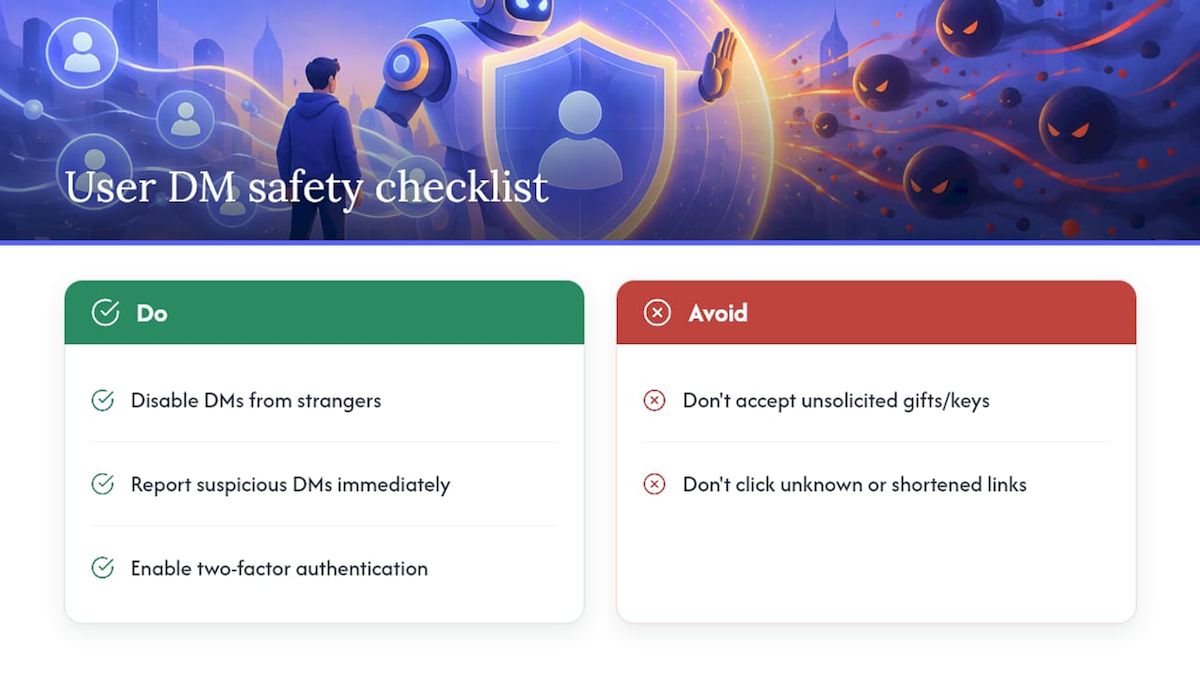
Turning off DMs from server members they don't know, available in each user's privacy settings, closes off the most common delivery path for scam links sent through shared servers. Members should also be wary of unsolicited nitro gifts, "free game key" offers, or urgent account-verification messages, since these are the most common bait used in DM scam campaigns.
Reporting suspicious messages immediately, rather than just deleting them, feeds Discord's spam detection systems and helps flag the sending account faster. Members should also avoid clicking shortened or unfamiliar links inside DMs, even ones that appear to come from a known contact, since compromised accounts are a common delivery method.
Encourage members to enable two-factor authentication on their own accounts. An account protected by 2FA is much harder to hijack and repurpose as a spam-sending vector against your community's other members.
How Discord's native report and block features work against DM spam
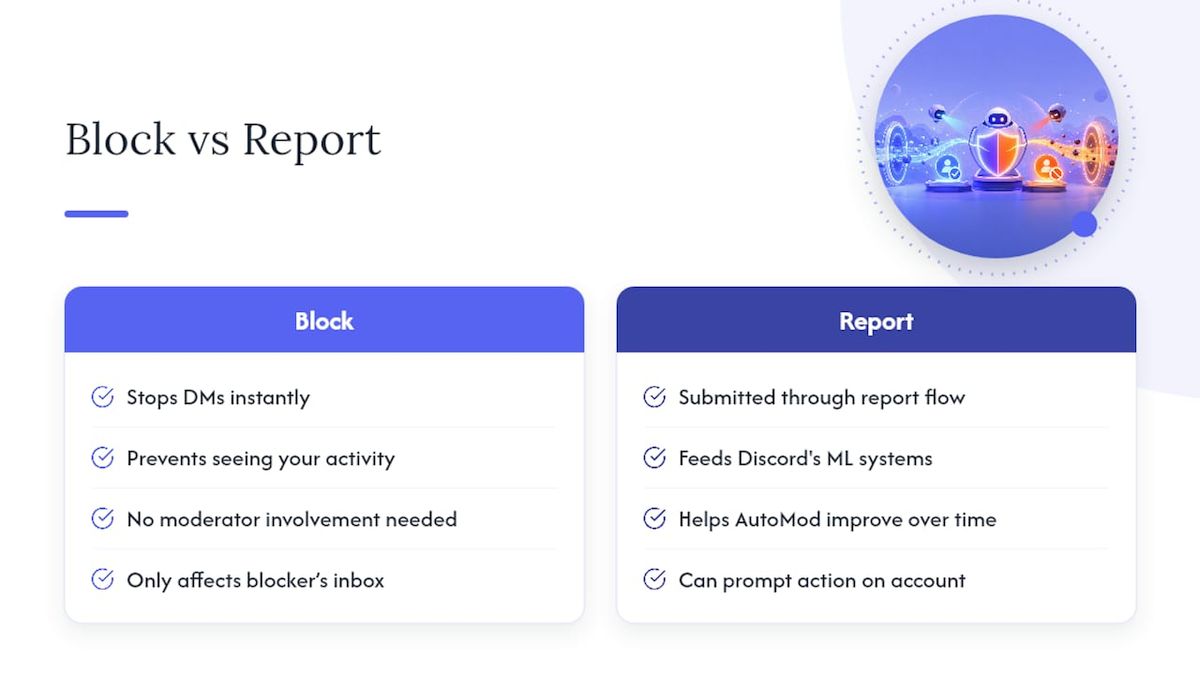
Discord gives every user two direct tools against DM spam: block and report. Blocking an account immediately stops that account from sending further direct messages or seeing the blocking user's activity, and it works instantly without needing moderator involvement.
Reporting is the more important tool at a community level. When a member reports a spam DM through Discord's built-in report flow, the report feeds into the same machine learning systems that inform AutoMod's Block Spam Content filter. Discord's own AutoMod FAQ notes that this filter can miss or misclassify messages, and that user reports are part of how the underlying detection improves over time.
For server moderators, encouraging members to report rather than just block matters because a blocked account can still be actively spamming other members in the same server. A report, especially from multiple members hit by the same account, gives Discord's trust and safety systems the signal needed to act on the account itself, not just one recipient's inbox.
Neither block nor report is instantaneous at the account-suspension level, which is why server-side controls like verification levels and AutoMod remain the faster line of defense for the community as a whole, even as individual reports strengthen detection over time.
Author perspective: choosing friction levels that protect without killing growth
Security on Discord isn't a switch, it's a dial. The instinct during a raid is to max out every setting, but a server stuck at Highest verification and locked invites for weeks just stops growing. The better habit is treating strict settings as temporary: raise them fast, contain the incident, then bring them back down deliberately.
Preconfiguration is what actually saves time. A runbook written before the emergency turns a panicked scramble into a five-minute checklist.
— Adam
Automate the playbook with Better Antispam
Everything in this playbook, spam-wave detection, channel lockdowns, and cleanup after an incident, is exactly what Better Antispam runs automatically once installed. Instead of a moderator manually spotting a raid and working through each step, the bot detects the pattern and reacts in real time, silencing spammers or locking channels before a human even opens Discord.

That speed is the real advantage: less time spent watching alert channels, less manual cleanup after the fact, and fewer permission mistakes made under pressure.
| What gets automated | Manual approach | With Better Antispam |
|---|---|---|
| Spam wave detection | Moderator reviews alerts | Detected and flagged automatically |
| Channel lockdown | Moderator changes permissions | Triggered in real time |
| Post-raid cleanup | Manual message deletion | Automated channel clean-up |
Set up Better Antispam on your server to see how much of this checklist runs itself.
Sources
DM spam and mass-messaging campaigns against a server tend to follow a small number of repeatable patterns. Coordinated raid groups often use freshly created or "burner" accounts, sometimes hundreds joining within seconds of each other, to flood channels or blast identical messages to multiple members at once. These accounts frequently rely on scripted bots or self-bots that automate joining a server and sending messages the moment access is granted, which is why join-timing patterns are one of the clearest raid signals.
Compromised accounts are another common vector: an account with a history of normal activity gets hijacked, often through a phishing link disguised as a Discord gift, nitro offer, or game key, and is then used to send scam links to that account's existing contacts and servers. Because the account looks legitimate, members are more likely to click.
Invite-link scraping is a third method. Attackers monitor public invite trackers or scrape invite codes from other servers, then feed them to raid bots that join en masse using those links. This is part of why pausing invites during an active incident, not just tightening permissions, cuts off a major attack surface.
Finally, mention-spam campaigns exploit @everyone or @here pings combined with malicious links, aiming to reach as many members as possible in a single message before moderators can react. AutoMod's mention-total limit exists specifically to blunt this pattern.
FAQ
What settings stop a Discord raid the fastest?
Pausing invites and DMs through Security Actions works fastest, since it cuts off new joins and mass messaging immediately. Follow it with a temporary verification increase and AutoMod's spam and mention filters for layered protection, as Discord's raid guidance recommends.
How many regex patterns can I add to an AutoMod rule?
Discord allows up to 10 regex patterns per applicable AutoMod trigger, alongside separate keyword filter and allow-list limits. Check the guild-level limits for your specific trigger type before building complex rule sets.
Does raising verification level block real members from joining?
A higher verification level adds requirements like a minimum account age or a verified phone number, which can briefly delay legitimate new members. Discord's verification levels guide notes that High requires an account older than five minutes and ten minutes in the server, so reverting to a lower level after an incident keeps onboarding smooth.
What permission does a bot need to time out spammers?
Timing out a member through AutoMod requires the Moderate Members permission, whether the action is triggered manually or automatically by a rule. Grant this permission narrowly to trusted moderator roles and bots rather than defaulting to Administrator.
When should a server add a specialist antispam bot instead of relying on AutoMod alone?
Add a specialist bot like Better Antispam when raids recur, message velocity outpaces manual moderation, or you need automated cleanup after an incident rather than manual deletion. Built-in AutoMod and verification handle steady-state spam well, but a dedicated bot adds real-time containment for repeated or fast-moving attacks.





















































