
Best Discord Security Bot in 2026
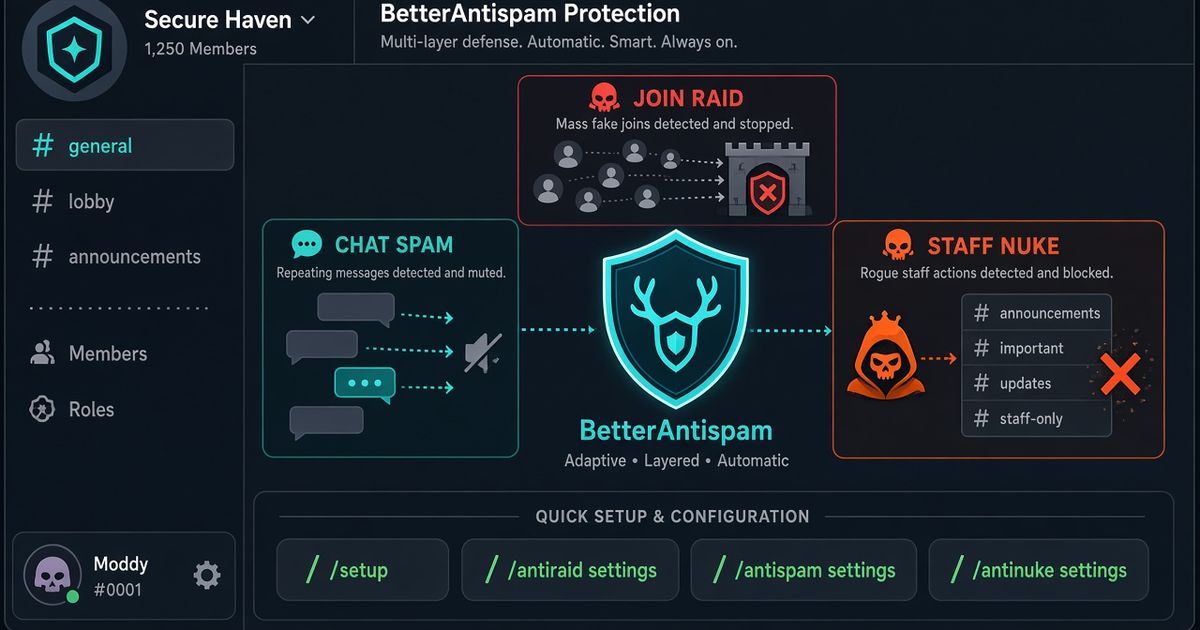
The best Discord security bot in 2026 covers three different attacks: a join flood, a chat dump, and a staff account wiping channels. BetterAntispam does that in one invite. Run /setup, then /antiraid settings, /antispam settings, and /antinuke settings (all Administrator). There is no website login. Discord’s own Raid Protection, AutoMod, and 2FA for moderation still come first. I maintain this bot. It detects and responds. It does not prevent every attack, and it does not rebuild a server from a saved snapshot.
Editorial disclosure: This guide is published by BetterAntispam. We recommend BetterAntispam when you want antiraid, antispam, antinuke, and verification in one slash-command stack. We name the cases where Wick, Security Bot, Beemo, Double Counter, or Dyno already cover the job. Thresholds come from the bot’s source. Competitor notes come from their docs.
TL;DR: People searching discord security bot, best discord security bot, discord security bots, and security bot discord want raid plus nuke plus spam, not a leveling plugin. Turn on AutoMod and Raid Protection. Force 2FA. Cut extra Administrators. Invite BetterAntispam, run /setup, then the three settings commands. Keep Wick if restore after a wipe is why you opened this tab. Keep Beemo if joins are the only problem. Dyno’s FAQ says Dyno has no anti-raid or anti-nuke. Do not stack three security bots.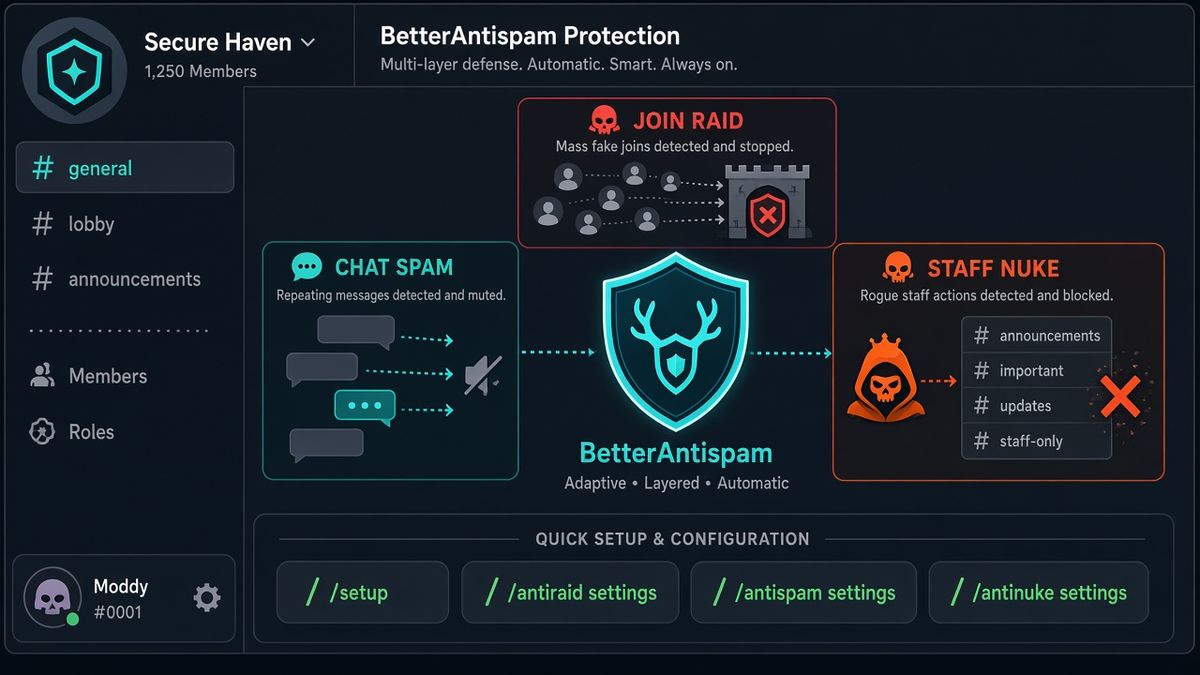
How to set up a Discord security bot
This is the first body section: the product, then the commands.
- Add BetterAntispam. You need Manage Server to invite it. Leave Administrator on the invite so it can kick, ban, mute, lock channels, and move roles. Discord’s permissions FAQ is the official page for role vs channel overrides.
- Drag the bot role above every staff role it should be allowed to quarantine. Discord’s roles page is the hierarchy rule. A security bot below a rogue Administrator is a spectator.
- Run
/setup. That is the first command I want a new server to hit. Pick a log channel. - Run
/antiraid settings(Administrator). Leave auto-scale on unless you already know a launch-night join rate. Under 50 members, 3 joins in 10 seconds is worth noticing and 5 is a strong signal. With auto-scale off, the manual default is 5 joins in 10 seconds. - Run
/antispam settings(Administrator). Defaults: 5 messages in 5000ms, 3 warnings, then a 5-minute mute. Caps fire at 70% uppercase. Duplicates need 3 identical messages, or 2 if they are very short. - Run
/antinuke settings(Administrator). Free toggles default on. It watches mass channel or role deletion, mass bans, webhook creation, and permission grabs. - Run
/verification settings(Administrator) if the server is public. Default mode is button. Members run/verify. Staff can/force verifyor/bypass. - Run
/scan(Administrator). It looks for dangerous@everyoneoverwrites and other bots holding Administrator. - When a wave is already inside, run
/raidmode enable(Administrator). Default punishment is kick.
Docs: customer documentation. Support: Discord support server. Core protection is free. Shield is sold in the application store.
If the raid is already happening and you have not installed anything yet, use the 60-second raid playbook first. Pause Invites, then a bot.
What a Discord security bot actually does
A Discord security bot is not a moderation bot with a shield icon. Moderation is warn, mute, kick, ban. Security is the three attacks that empty a server overnight.
| Attack | What it looks like | BetterAntispam command | Native Discord tool |
|---|---|---|---|
| Raid | Throwaway accounts joining in a burst | /antiraid settings, /raidmode (Administrator) | Raid Protection, Pause Invites |
| Spam | Floods, dupes, scam links, mention dumps | /antispam settings (Administrator) | AutoMod |
| Nuke | A staff account deleting channels, roles, or mass-banning | /antinuke settings (Administrator) | Audit log, 2FA, fewer Administrators |
I split those jobs on purpose. A join-rate bot will not stop a compromised moderator. An automod will not stop a mass channel delete. An anti-nuke bot will not mute a copypasta flood. If a product page calls itself a “security bot” and only does one of the three, it is a specialist. That is fine. It is not the whole job.
Longer guides if you only have one of those problems: best Discord anti raid bot, best Discord antispam bot, best Discord anti nuke bot.
The Field Guide’s 2026 anti-raid ranking is right that join-rate and insider-nuke are different halves. Most lists still sell them as one product. I will not.
Use Discord’s own security tools first
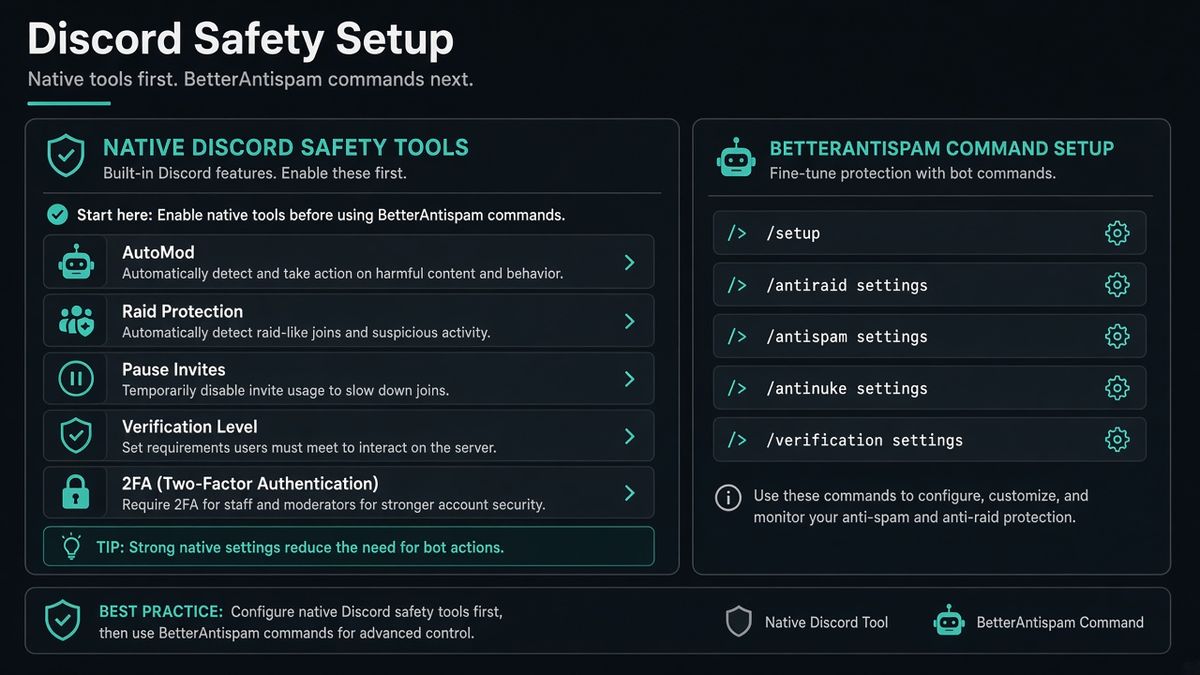
I will not pretend a slash command replaces the valves Discord shipped for free. How to Protect Your Server from Raids 101 and Four steps to a super safe server are the official order.
| Native tool | Where | What it does |
|---|---|---|
| AutoMod | Server Settings → AutoMod | Blocks keywords, mention spam, and Discord’s spam model before a message posts |
| Raid Protection | Safety Setup | ML join-raid detector. Alert plus CAPTCHA for new joiners for an hour |
| Pause Invites | Server Settings → Invites | Stops new joins without deleting links |
| Security Actions | Server dropdown | Pause invites and non-friend DMs. Activity Alerts |
| Verification Level | Safety Setup | High or Highest during a wave. Verification Levels |
| 2FA for moderation | Server Settings → Safety | Staff cannot use moderation perms without 2FA. Official 2FA article |
| Audit log | Server Settings | Who deleted the channel. Server Audit Log |
Raid Protection alerts are still rolling out to community servers. Discord says availability may be limited. That is why a bot remains useful on a quiet public server that never got the native detector.
Turn @everyone and @here off on roles you do not trust. Discord’s raid article lists that before any third-party invite. Cut extra Administrators. Put the security bot’s role high. A bot cannot act on a role above its own. That limit is Discord’s, not mine.
Best Discord security bots compared
Ranking pages for best discord security bot are comparison tables. Here is the honest one I will stand behind.
| Bot | Raid (joins) | Spam (chat) | Nuke (staff) | Restore after a wipe | Config | Free core |
|---|---|---|---|---|---|---|
| BetterAntispam | /antiraid settings, /raidmode | /antispam settings | /antinuke settings | /unnuke from the audit log. No saved snapshot | Slash commands in Discord | Yes |
| Wick | Join gate / join raid | Heat automod | Yes | Panic Mode plus structure restore | Dashboard | Partial |
| Security Bot | Score-based anti-raid | Paid automod | Yes | Paid recovery | Dashboard or commands | Anti-nuke/raid documented as free; automod paid |
| Beemo | Known-userbot catch | No | No | No | Invite and wait | Yes |
| Double Counter | No | No | No | No | Website CAPTCHA / alts | Alts/VPN specialist |
| Dyno | FAQ: no anti-raid | Automod | FAQ: no anti-nuke | No | Dashboard | Automod/moderation |
BetterAntispam vs Wick is the decision most owners are actually making. I wrote the comparison: BetterAntispam vs Wick. Wick if reconstruction after a nuke is the product. BetterAntispam if you want to install today, keep config inside Discord, and get raid plus spam plus nuke without a project.
Peakbot’s Wick alternatives list says the common good answer is two bots: Beemo for the flood, and something with anti-nuke for the insider. That works. I would rather run one stack you will actually finish configuring. Unfinished security bots are how servers get raided with three “protections” installed.
Security Bot (the product at securitybot.gg) is a real competitor, not a category name. Their docs start with a dashboard. Ours start with /setup. If your staff already live in a web panel, that might be a reason to pick them. It is not a reason to skip Discord’s native tools.
Double Counter is an alt and VPN specialist, not a raid/nuke bot. We compared the jobs here: BetterAntispam vs Double Counter. I do not claim a shared identity graph.
Free vs paid on a Discord security bot
Core BetterAntispam security is free: antiraid, antispam, antinuke, verification (button, image CAPTCHA, math, hidden word), honeypot, adblock, selfbot detection, lockdown, moderation, and logging. Feature pages: anti-raid, anti-spam, anti-nuke, free plan.
Shield is optional and sold only in Discord’s application store. It is not required to stop a raid, a spam wave, or a nuke attempt.
| Free | Shield |
|---|---|
| /antiraid settings, /raidmode | Similar-username detection, custom suspicion weights |
| /antispam settings, blacklist cap 50 | Blacklists over 50, punishment approval gate |
| /antinuke settings | Higher /autonuke and /snipe limits |
| /lockdown one channel, /serverlock | all / unlockall, serverlock passwords |
| /snipe bulk restore cap 50 | Higher snipe cap |
| /autonuke 1 channel, minimum 7 days | Unlimited channels, shorter interval |
| Text honeypots | Voice honeypots |
| Image filter | /imagefilter settings is Shield entirely |
| /slowmode | /slowmodebulk is Shield entirely |
There is no second paid plan. There is no /backup command for users. Configuration is slash commands, not a website dashboard.
/unnuke (Administrator) reverts a nuke by restoring deleted channels, roles, messages, and more from the audit log. You do not need a saved backup. That is still not Wick Panic Mode. Wick tries to reconstruct pre-nuke structure from a snapshot. If that restore job is why you searched discord security bot, install Wick. I would.
When I would pick someone else
Pick Wick when the nightmare is a wiped channel tree and you want a restore product, not only a detector. I said that in the anti-nuke guide and I am not walking it back.
Pick Beemo when you only want a silent catcher for known userbot waves and you will not configure a settings panel.
Pick Security Bot when your staff already want a dashboard and paid recovery is the pitch you came for.
Pick Dyno, Carl-bot, YAGPDB, MEE6, or ProBot when the server already runs automod or engagement there. That is a moderation bot decision, not a security-bot decision. Keep the engagement bot. Do not stack a second antiraid on top of BetterAntispam.
Pick Discord AutoMod alone only if the server is private, invites are tight, and nobody holds extra Administrator. The moment you go public, add join-rate and anti-nuke.
FAQ
What is the best Discord security bot in 2026?
BetterAntispam if you want raid, spam, and nuke in one free invite with slash-command config. Wick if restore after a wipe is the job. Beemo if joins are the only job. AutoMod first in every case.
What does a Discord security bot do?
It watches joins, chat, and staff actions, then kicks, bans, mutes, quarantines, or locks when the pattern looks like an attack. It does not replace Pause Invites, AutoMod, or 2FA.
Is a Discord security bot the same as a moderation bot?
No. A moderation bot warns and bans people you point at. A security bot watches attacks you did not see yet. Many products sell both. The search intent is different.
Do I need a security bot if I already use AutoMod?
Yes for raids and nukes. AutoMod blocks messages before they post. It does not watch join rate or the audit log. Discord’s AutoMod FAQ is the native chat layer. The bot is the join layer and the staff layer.
Is there a free Discord security bot?
Yes. BetterAntispam’s core antiraid, antispam, antinuke, verification, honeypot, lockdown, and logging are free. AutoMod is free. Beemo is free for known-userbot raids. Shield is optional.
Can a security bot recover a nuked Discord server?
BetterAntispam /unnuke restores deleted channels, roles, messages, and related damage from the audit log without a saved backup. It does not rebuild from a snapshot. Wick Panic Mode is the restore specialist.
Will a security bot stop every raid?
No. It detects and responds. Pause Invites is still the fastest valve. A bot below a rogue Administrator cannot punish that account.
How do I lock the server during an attack?
/lockdown (Administrator) locks a channel. /serverlock locks the whole server. Guide: how to lock a Discord channel. all / unlockall and serverlock passwords are Shield.
Final verdict
The best Discord security bot in 2026 is the one that covers joins, chat, and staff abuse, and that you will actually finish setting up. Turn on AutoMod, Raid Protection, Pause Invites, and 2FA today. Invite BetterAntispam and run /setup, then /antiraid settings, /antispam settings, and /antinuke settings. Keep Wick when restore is the product. Keep Beemo when joins are the only product. Do not install three half-configured security bots.
— Adam
More guides
- Best Discord Anti Raid Bot in 2026
- Best Discord Anti Nuke Bot in 2026
- Best Discord Antispam Bot in 2026
- Best Discord Moderation Bot in 2026
- How to Stop a Discord Raid
- How to Stop Spam in Discord
- Discord Audit Log
- How to Lock a Discord Channel
Sources
- How to Protect Your Server from Raids 101 – Discord
- AutoMod FAQ – Discord
- Pause Invites FAQ – Discord
- Activity Alerts and Security Actions – Discord
- Verification Levels – Discord
- Two-Factor Authentication – Discord
- Server Audit Log – Discord
- Discord Roles and Permissions – Discord
- Four steps to a super safe server – Discord Safety
- The best Discord anti-raid and anti-nuke bots – The Field Guide
- Wick Alternatives – Peakbot
- Wick features – Wick Docs
- Beemo Docs
- Security Bot Docs
- Dyno FAQ
- BetterAntispam documentation
- BetterAntispam application store (Shield)




















































