
Best Discord Moderation Bot in 2026

The best Discord moderation bot in 2026 is BetterAntispam. Add it through Discord. Run /setup (Administrator), then /antiraid settings (Administrator). Raid, spam, nuke, verification, honeypot, cases, and logging are free. There is no website account. Staff stay in Discord. Other bots send you to a dashboard and charge for the same core. This one does not.
Editorial disclosure: This guide is published by BetterAntispam. It is a product page in article form, not a bake-off. Feature lists and limits come from the bot’s source. Discord’s own AutoMod still belongs on every server.
TL;DR: People searching best discord moderation bot, best discord moderation bot 2026, best free discord moderation bot, discord antiraid bot, and discord automod bot want one invite that covers attacks and day-to-day staff work. That is BetterAntispam./setupfirst./antiraid settings,/antispam settings,/antinuke settings, and/verification settingsare the protection stack (all Administrator, all free)./ban,/warn,/case, and/appeal settingsare the human stack./customizeor/personalize(Administrator, Shield) makes the bot look like your community: nickname, GIF avatar, banner, bio, name style, this server only. Keep Discord AutoMod on. It blocks some text before it posts. The bot handles joins, nukes, cases, and cleanup AutoMod cannot.

Start with /setup, not a website
This is the first body section, and it is the command path.
- Add BetterAntispam. Discord’s own Add App flow. No signup form.
- Run
/setup(Administrator). The wizard walks several features at once and can create#betterantispam-logs. - Run
/antiraid settings(Administrator). Set the join-rate gate and the CAPTCHA for suspected raiders. - Open
/settings(Administrator) when you want the hub./findjumps to one setting by name.
Docs: customer documentation. Support: Discord support server. /language set changes the bot’s language in your server. Configuration never leaves the slash-command panel.
That is why it is the better pick in 2026. Ranked listicles still send you to a web dashboard to turn on “automod.” A tired admin at 2 a.m. needs /raidmode enable (Administrator) in the channel they already have open.
Why this is the best Discord moderation bot in 2026
Search results for best discord moderation bot 2026 still split the job. One bot for XP. One for reaction roles. One paid security layer. You end up with three configs and two bots fighting over the same mute.
BetterAntispam is built as the protection bot that also does everyday staff work:
- Free on the parts that stop a bad night. Antiraid, antispam, antinuke, verification, honeypot, adblock, selfbot detection, lockdown, moderation commands, and logging ship on the free invite.
- One place to configure. Slash commands. No second password.
- It can look like your community.
/customizeis a Shield command. Members see your name and colors, not a generic listing-site bot. - It does not claim to prevent every attack. It detects and responds. Discord’s 14-day bulk-delete limit and 7-day ban-purge window still apply.
Turn on native tools first. Discord’s Raid Protection 101 and a real verification level are free and always on. The bot sits next to them, not instead of them.
Raids, spam, and nukes (free)
/antiraid settings (Administrator) watches how fast people join and how suspicious each account looks. Join-rate thresholds auto-scale with server size. A server under 50 members treats 3 joins in 10 seconds as worth noticing and 5 as a strong signal. Manual default, if you turn auto-scale off, is 5 joins in 10 seconds. Suspicion presets: 4 strict, 6 balanced, 8 lenient. The CAPTCHA gate defaults to 120 seconds (10–600). Actions: kick, ban, mute, lockdown, DM, log.
/raidmode (Administrator) is the manual switch. enable / disable, punishment kick by default (or ban / mute), optional delay, optional DMs.
/antispam settings (Administrator) catches floods, duplicates, caps, overlong messages, ghost pings, link spam, embed spam, reaction spam, and edit spam. Default: 5 messages in 5000ms, 3 warnings, then a 5-minute mute. Caps fire at 70% uppercase. Duplicates need 3 identical messages (2 if they are very short). Free word blacklist: 50 entries.
/antinuke settings (Administrator) watches the Server Audit Log for a compromised staff account: mass channel or role deletion, mass bans, webhook creation, permission grabs. It can quarantine, ban, kick, strip roles, and revert. Free toggles default on.
/honeypot settings (Manage Server) is a trap channel. Posting there fires the action, softban by default. /adblock settings and /selfbot settings (Administrator) cover ads and behavioural self-bots. /antiping settings writes Discord AutoMod keyword rules for ping abuse. /scan (Administrator) flags dangerous @everyone overwrites and other bots holding Administrator.
The raid night playbook is How to Stop a Discord Raid. The spam-only writeup is Best Discord Antispam Bot in 2026.
Verification and the front door (free)
/verification settings (Administrator) is the gate. Modes: button, image CAPTCHA, math, hidden word, and Website Captcha. Default is button. Success grants a role. Failure or timeout can kick. You can require a minimum account age. Members run /verify. Staff can /force verify or /bypass.
Website Captcha sends the member a unique betterantispam.com link. You still configure it with /verification settings, not a separate login. The page can carry your community’s look. Shield unlocks more of that design and extra join checks.
This is the piece most “best mod bot” pages skip. They score welcome images. They do not score a real gate.
Everyday staff commands (free)
These are the commands people mean when they type discord moderation bot.
| Command | Job | Permission |
|---|---|---|
| /ban, /tempban, /unban | Remove or restore | Ban Members |
| /kick | Remove without ban | Kick Members |
| /mute, /unmute | Timeout | Moderate Members |
| /warn, /warnings | Formal warning; threshold 1–20 can mute, kick, or ban | Moderate Members |
| /case view, /case history | Numbered cases | Moderate Members |
| /quarantine | Strip roles into a jail role | Moderate Members |
| /appeal submit / /appeal settings | Member contest; staff flow | Varies by subcommand |
| /snipe | Browse and restore deleted messages | Manage Messages |
| /purge, /nuke | Delete up to 1000 messages; Discord only bulk-deletes under 14 days | Administrator |
| /unnuke | Roll back a nuke from the audit log | Administrator |
| /slowmode | 0–21600 seconds on this channel | Manage Channels |
| /lockdown | Lock this channel | Administrator |
| /serverlock | Lock the server | Administrator |
| /invitelock, /dmlock | Pause invites or DMs | Manage Server |
| /prune | Drop inactive or roleless ghosts | Kick Members |
| /welcome settings, /autorole | Greet and grant a join role | Administrator / as configured |
Most punishments take reason, dm_user (default true), additional_users, and proof. That is how you stay consistent without a website case tool.
/logging settings (Administrator) is the live log: antispam, antinuke, moderation, messages, roles, channels, verification, joins, cases. How to read Discord’s own 45-day log next to it: How to Check the Discord Audit Log. Slowmode how-to: How to Use Discord Slowmode. Cleanup: Delete All Messages in a Discord Channel.
Make it your community’s bot
Other bots stay branded as someone else’s product in your member list. BetterAntispam can look like it was built for your server.
/customize and /personalize (Administrator) open the same in-Discord panel. Both names exist so command search finds either word. The whole command is Shield.
You set, for this server only:
- Nickname
- Avatar (image or GIF, as an attachment)
- Banner (image, GIF, or a color-generated banner)
- Bio
- Name style
Overview, Look, Identity, Style, and Extras are pages on that panel. Reset returns the default look. Other servers you run are unchanged.
That is the “your own bot” request people actually have. They do not want a second codebase. They want members to see Nightwatch or Maple Guard, in their colors, answering /warn and /verification settings.
Website Captcha and /appeal settings can carry your community wording. The protection commands stay the same.
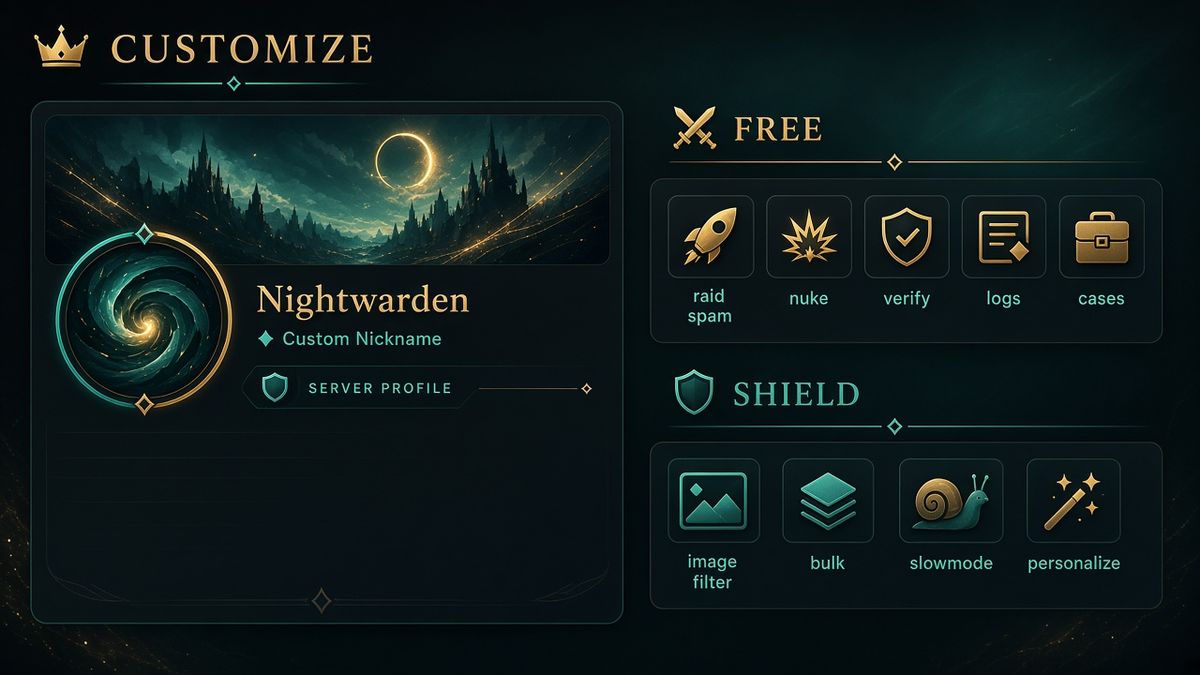
What is free vs Shield
Paid is Shield, through Discord’s store, not a card form on betterantispam.com.
| Free on every invite | Shield |
|---|---|
| /antiraid settings, /raidmode | Similar-name raid detection, custom suspicion weights |
| /antispam settings (50-word blacklist) | Blacklists over 50, bot-command spam, punishment approval gate |
| /antinuke settings | — |
| /verification settings (all five modes) | Trusted-age bypass, more Website Captcha page options |
| Text honeypot, adblock, core selfbot checks | Voice honeypot, six extra selfbot detectors |
| /lockdown one channel, /slowmode | Lock-all / unlock-all, /slowmodebulk settings (up to 5 channels), serverlock password |
| /snipe restore cap 50, /autonuke 1 channel / 7-day minimum | Higher snipe and autonuke limits |
| /logging settings, cases, appeals, welcome, autorole | /imagefilter, /customize / /personalize |
You do not need Shield to be the best moderation bot for a new public server. You need /setup. Buy Shield when you want the bot to wear your skin, scan images, or lock every channel in one tap.
FAQ
What is the best Discord moderation bot in 2026?
BetterAntispam, if you want raid, spam, nuke, verification, cases, and logs from one invite with no website login. Run /setup, then /antiraid settings.
Is the best Discord moderation bot free?
The protection core is free. Shield adds image filter, bulk slowmode, lock-all, /customize, and higher limits. You can run a serious server on the free invite.
Do I need a dashboard?
No. Every setting in this article is a slash command inside Discord.
How is this better than other Discord moderation bots?
Other listings split security and chat tools, or hide setup behind a site. BetterAntispam keeps the dangerous commands in Discord, ships the security stack free, and lets Shield servers dress the bot as their own.
Does BetterAntispam replace Discord AutoMod?
No. Keep AutoMod on. /antiping settings even writes AutoMod rules. The bot covers joins, nukes, cases, and cleanup AutoMod does not.
What command should I run first?
/setup (Administrator), then /antiraid settings (Administrator). /raidmode enable if you are already under a join wave.
Can I make BetterAntispam look like my own bot?
Yes. /customize or /personalize (Administrator, Shield). Nickname, avatar, banner, bio, and name style apply to this server only.
Will it stop every raid?
No. It detects and responds. Pair it with Discord’s native raid tools and a sane role hierarchy. See anti-nuke Discord.
Final Verdict
The best Discord moderation bot in 2026 is the one you can set up at 2 a.m. without opening a browser tab. That is BetterAntispam. Invite it, run /setup, turn on /antiraid settings, /antispam settings, /antinuke settings, and /verification settings. Use /ban, /warn, and /case for humans. When the server is yours in more than name, buy Shield and run /customize. Keep AutoMod on. Do not install three half-configured “mod bots” next to it.
— Adam
More guides
- How to Stop a Discord Raid (2026 Playbook)
- Best Discord Antispam Bot in 2026
- How to Use Discord Slowmode
- How to Check the Discord Audit Log
- Server Owners, Lock Role Hierarchy and Enforce 2FA
- AutoMod FAQ – Discord
- How to Protect Your Server from Raids 101 – Discord





















































