
BetterAntispam TeamHow we write these6 min read
Discord Clear Chat Command: Delete Messages in Bulk
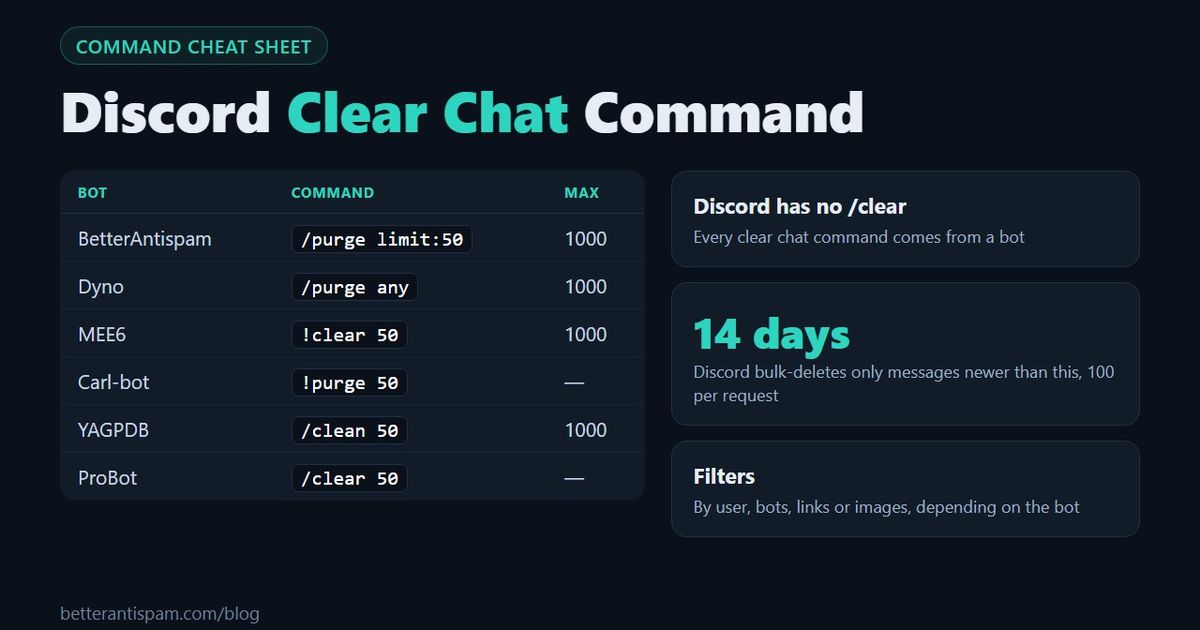
Discord has no built-in clear chat command. To delete messages in bulk you add a bot and use its command: /purge in BetterAntispam and Dyno, !clear in MEE6, /clear in ProBot, /clean in YAGPDB. In BetterAntispam, open the channel and run /purge limit:50 to delete the last 50 messages, or /purge with no number to clear the whole chat. The command needs Administrator, and it accepts 1 to 1,000 messages per run. Messages newer than 14 days are deleted in bulk. Older ones are deleted one by one, which is slower. That limit comes from Discord, not from any bot.
Editorial disclosure: This guide is published by BetterAntispam. Command names and limits for BetterAntispam come from its source code. For other bots, each row links to that bot’s own documentation. I also say where another bot is the better choice.
How to clear chat with /purge
It takes about a minute, including adding the bot.
- Add BetterAntispam to your server. You need the Manage Server permission to add a bot.
- Open the channel you want to clear.
- Type
/purgeand choose the BetterAntispam command. You need Administrator to run it. - Set
limitto a number from 1 to 1,000, or leave it empty to clear the whole channel. - If the channel is large or has many old messages, the bot shows a confirmation with a time estimate. Confirm, or cancel if you are in the wrong channel.
/purge limit:50
/purge limit:1000
/purge
The bot needs Manage Messages in that channel, or it replies that it cannot delete. /purge is free. If you set a log channel with /logging settings (Administrator), the bot saves a transcript of the deleted messages there.
Does Discord have a clear chat command?
No. Discord has no /clear, no /purge and no “clear chat” button. Without a bot, you have three options:
| Native option | What it does | Limit |
|---|---|---|
| Delete one message | Hover, then Delete. Hold Shift to skip the confirmation | One at a time |
| Clone the channel, delete the original | Gives you an empty channel with the same permissions | New channel ID, so webhooks and bot settings break |
| Ban with “delete message history” | Removes one member’s recent messages | Up to 7 days, one member |
To delete other people’s messages you need the Manage Messages permission. Discord’s permissions FAQ explains how roles and channel overrides work, and our guide to Discord permissions covers each one.
Clear chat commands by bot
If you already use one of these bots, use its command. You do not need a second bot for cleanup.
| Bot | Command | Maximum | Filters |
|---|---|---|---|
| BetterAntispam | /purge with optional limit | 1,000 per run, or the whole channel | None. Also deletes messages older than 14 days |
| Dyno | /purge any, /purge bots and more | 1,000 | By user, bots and message type |
| MEE6 | !clear 50 or !clear @user | 1,000 | By user |
| Carl-bot | !purge, !purge user, !purge bot | See their docs | By user and bots. Skips pinned messages |
| Wick | w!purge | 1,000 in their example | Bots, links and attachments |
| YAGPDB | /clean (also clear) | Scans the last 1,000 | By user and regex |
| ProBot | /clear | See their docs | By user and bots |
Command names change, so check the linked page if a command does not appear in your slash menu.
Filters: clear only some messages
A filter deletes only the messages that match, such as one user’s messages or messages with links. This is where the bots differ most.
| You want to delete | Best option |
|---|---|
| The last N messages | Any bot. /purge limit:50 in BetterAntispam |
| One user’s messages | Dyno, MEE6 (!clear @user), Carl-bot or YAGPDB |
| Only bot messages | Dyno (/purge bots), Carl-bot (!purge bot), ProBot |
| Only links or attachments | Wick |
| Messages matching a pattern | YAGPDB /clean with regex |
| Everything, including old messages | BetterAntispam /purge with no limit |
| A spammer’s messages while you ban them | /ban with purge_days (up to 7 days) |
I will be direct about the limitation: BetterAntispam’s /purge has no filters. Its only option is limit. If you often need “delete only what @user wrote”, Dyno or Carl-bot is the better tool for that job. What BetterAntispam does well is the full clear, because it does not stop at 14 days.
If the spam is still arriving, a filter is the wrong tool. Stop it first with /antispam settings (Administrator), then clean up. See how to stop spam in Discord.
The 14-day limit explained
Bots can only bulk-delete messages that are newer than 14 days. This is a rule of Discord’s bulk delete endpoint, and every bot has to follow it.
| Rule | What it means |
|---|---|
| 2 to 100 messages per request | Clearing 500 messages takes several requests |
| Nothing older than 14 days | Older messages are rejected by Discord |
| Bot needs Manage Messages | Your own permission is not enough |
| Servers only | It does not work in DMs |
Bots handle old messages in two ways. Most stop: Dyno’s documentation says it cannot purge messages older than 14 days, and YAGPDB ignores them. BetterAntispam continues and deletes the older messages one at a time. That works, but it is slow. A few hundred old messages can take several minutes because of Discord’s rate limits.
If you need an old channel empty right now, recreating it is faster. /purge with no limit offers a recreate button when the bot has Manage Channels. The new channel has a new ID, so check your webhooks first. The full comparison is in how to clear a Discord channel and how to delete all messages in a Discord channel.
Why the clear command is not working
Most failures have one of these causes.
- The command does not appear. The bot is not in the server, or you do not have the permission the command requires. BetterAntispam’s
/purgeis only shown to Administrators by default. - “I can’t delete messages here.” The bot is missing Manage Messages or Read Message History in that channel. Check the channel’s permission overrides.
- It stops before the end. The remaining messages are older than 14 days and your bot skips them.
- It is very slow. The bot is deleting old messages one by one. Let it finish, or recreate the channel.
- You are in a DM. Bots cannot clear DMs.
Can you undo a clear?
Partly. Discord has no undo for deleted messages. In BetterAntispam, /snipe (requires Manage Messages) shows recently deleted messages and can restore them, up to 50 at once on the free plan. For a large clear, the transcript in your log channel is the only complete copy, so set up logging before you purge. To see who deleted messages by hand, use the Discord audit log.
If your goal is to calm a channel and not to empty it, slowmode or locking the channel is usually a better first step.
FAQ
What is the command to clear chat in Discord?
There is no built-in command. With a bot, it is /purge (BetterAntispam, Dyno), !clear (MEE6), /clear (ProBot), !purge (Carl-bot) or /clean (YAGPDB). For example, /purge limit:100 deletes the last 100 messages in the channel.
How do I delete 1,000 messages at once in Discord?
Run /purge limit:1000 with BetterAntispam, or the equivalent in Dyno or MEE6. The bot sends several requests of up to 100 messages each. Messages newer than 14 days are removed in seconds.
Why can’t bots delete messages older than 14 days?
Discord’s bulk delete endpoint rejects them. A bot can still delete old messages individually, which is what BetterAntispam does, but it takes much longer.
Can I clear only one user’s messages?
Yes, with a bot that has a user filter, such as Dyno, MEE6, Carl-bot or YAGPDB. BetterAntispam’s /purge cannot filter by user. If you are banning the member, /ban with purge_days removes up to 7 days of their messages.
Can I clear a DM chat on Discord?
No. Bots cannot work in DMs, and Discord has no clear button there. You can delete your own messages one at a time. The other person’s copy of their own messages stays. Scripts that automate your account break Discord’s terms and can get the account disabled.
What permission do I need to clear chat?
It depends on the bot. BetterAntispam’s /purge requires Administrator. Many other bots require Manage Messages. In all cases the bot itself needs Manage Messages in the channel.
Is there a free clear chat bot?
Yes. /purge in BetterAntispam is free, and Dyno, Carl-bot and YAGPDB include their purge commands for free as well.
The short version
The Discord clear chat command always comes from a bot. Use /purge limit:50 for a quick cleanup, and choose a bot with filters if you need to target one user, bots or links. Remember the 14-day limit: newer messages go in bulk, older ones go slowly or not at all. If you want a clear command that also handles old messages, plus spam and raid protection in the same bot, add BetterAntispam. It is free to add.
Core is free · Setup in Discord
Ready to protect your server?
Invite BetterAntispam. Core antiraid, antispam, and antinuke are free. Configuration is slash commands inside Discord.