
BetterAntispam TeamHow we write these6 min read
How to Set Up Auto Role on Discord (Step by Step)
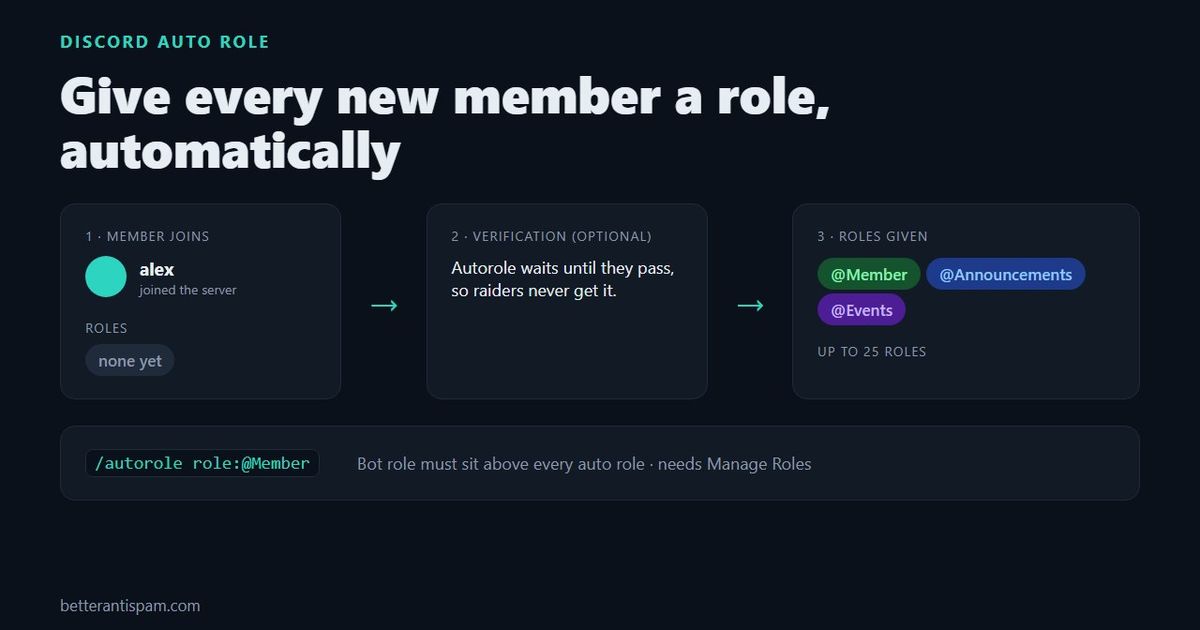
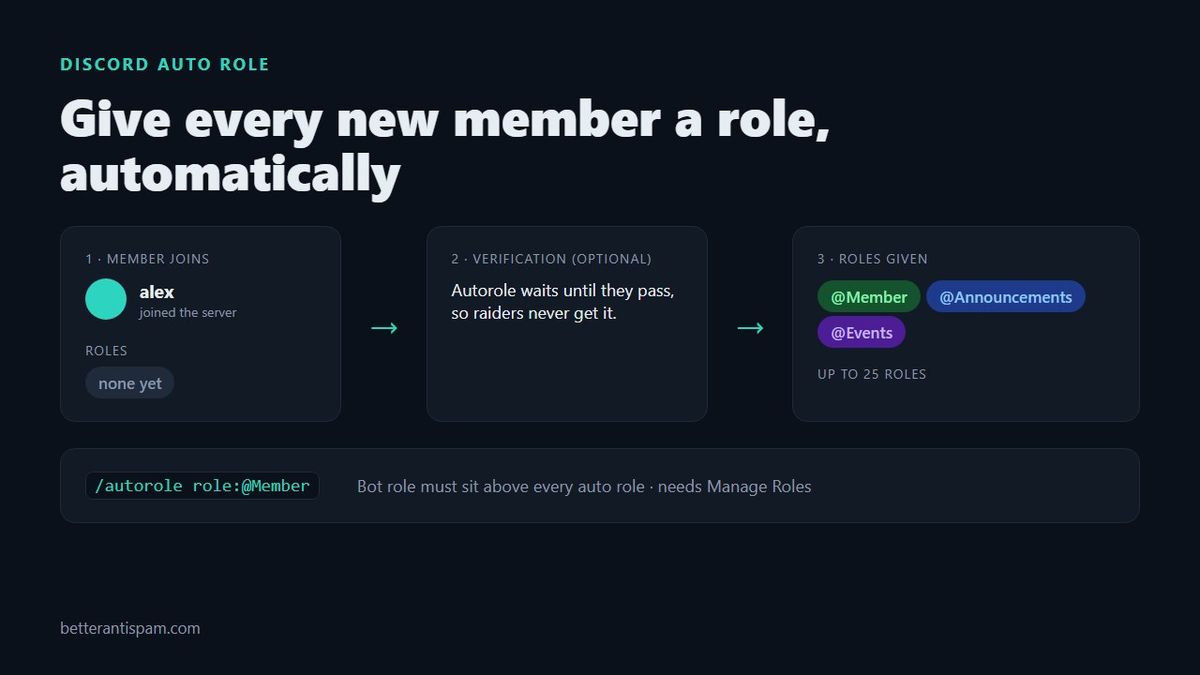
To set up auto role on Discord, add a bot that assigns roles on join, then pick the role. Discord has no built-in setting that gives every new member a role. With BetterAntispam, it is one command: /autorole role:@Member. Then drag the bot’s own role above @Member in Server Settings → Roles, because a bot can only hand out roles that sit below its highest role. If you also turn on verification, the bot waits until each member passes before it gives the role, so raiders and bot accounts never get it.
Editorial disclosure: This guide is published by BetterAntispam. Discord’s own options come first because they are free and sometimes enough. Every bot behaviour below comes from BetterAntispam’s source code.
What is auto role on Discord?
An auto role is a role a member gets automatically, without a moderator clicking anything. It is almost always given on join (or right after verification) and is used to:
- Unlock channels that
@everyonecan’t see, so new members have a clear “you’re in” moment - Sort the member list so members show in their own group
- Opt everyone into announcement or event pings by default
- Tell new members apart from verified ones while they settle in
It is different from reaction roles and self roles, where members choose roles from a message. Auto role is for the role everyone should have.
Can Discord give roles automatically without a bot?
Not to everyone. Discord has two native options that get close:
| Option | How it works | Good for | The catch |
|---|---|---|---|
| @everyone as your member role | Set the permissions you want new members to have on @everyone | Small servers with no verification | Everyone has it instantly, including raiders. No way to tell new from trusted |
| Onboarding questions | Community servers ask new members questions; each answer can give roles and channels | Letting members pick interests and pings | Members choose. It is not one fixed role for everyone. Community must be enabled |
| A bot auto role | The bot gives the role the moment someone joins, or after they verify | A real “Member” role for everyone | The bot’s role must sit above the auto role |
My honest take: if your server is small, public and calm, @everyone is fine and you don’t need an auto role at all. Once you add verification or want a “new member” stage, use a bot. Onboarding works well alongside one: the bot gives @Member, and Onboarding handles the optional roles.
How to set up auto role with BetterAntispam
It takes about a minute. Core features are free.
- Invite BetterAntispam. Make sure its role has Manage Roles.
- Create the role if you don’t have it: Server Settings → Roles → Create Role, for example
Member. Set its channel access now. - Move the bot’s role above it. In Server Settings → Roles, drag the bot’s role (named after the bot) above
Member. This is the step most people miss (more below). - Run the command. In any channel, type
/autorole role:@Member. You need Administrator to use it. - Test it. Join with an alt or ask a friend to join. They should have
Memberwithin a second.
Give more than one auto role
Run /autorole with no options. You get a menu where you pick up to 25 roles. Everyone who joins gets all of them in a single update. The same menu shows what is set now, and has a button to turn autorole off.
Change or turn off auto role
- Change it: run
/autorole role:@NewRole, or open the menu with/autoroleand change the picks. - Turn it off: run
/autoroleand press the button to turn it off. New members stop getting the roles. Members who already have them keep them.
Why isn’t my auto role working?
Nine times out of ten it is the role order. A bot can only give roles that are below its own highest role. Discord explains the hierarchy in Role Management 101. BetterAntispam checks this when you set the role and tells you if the role is too high, but if you move roles around later it can break silently.
Work through this list:
| Problem | Fix |
|---|---|
| Bot’s role is below the auto role | Drag the bot’s role above it in Server Settings → Roles |
| Bot lacks Manage Roles | Give its role Manage Roles |
| The role is managed by an integration (a booster role or another bot’s role) | Pick a normal role. Discord doesn’t let bots assign managed roles |
| You picked @everyone | Everyone already has it. Pick a real role |
| Verification is on and the member hasn’t passed | Working as intended. The role comes after they verify |
| The role was deleted | Set a new one with /autorole |
| The role is above your highest role | Only the owner can set a role above their own top role. Ask the owner or move the role |
If you are not sure what a permission does, our guide to Discord permissions explained walks through each one.
Auto role and verification: do it in that order
An auto role given the instant someone joins also goes to every raider and bot account that joins. If your Member role unlocks your chat, a raid now has full access in the first second.
BetterAntispam handles this for you. When its verification is on, autorole does not run on join. The bot gives the auto roles after the member passes verification, alongside the verified role. When verification is off, autorole runs on join.
A setup I like for most community servers:
@everyonecan only see#rulesand#verify.- Members verify with a button or captcha. See how to set up a Discord verification bot.
- On passing, they get
Memberand your default ping roles from autorole. - Onboarding, or a roles channel, lets them add interest roles afterwards.
It also stops a lot of the accounts covered in how to stop bots joining your Discord server before they ever see a channel.
Should the auto role have any dangerous permissions?
No. Treat your auto role like @everyone: everyone, including someone who joined thirty seconds ago, will have it. Keep these off on it:
- Administrator, ever
- Mention @everyone, @here and All Roles, the favourite of spam raids
- Manage Messages, Manage Channels, Manage Roles, Manage Webhooks
- Create Invite, if you want to control who can invite
BetterAntispam adds a guard here. If a staff member who isn’t the owner tries to set a role with Administrator as an auto role, the bot DMs the owner with Approve and Deny buttons and does nothing until the owner answers. This is the owner_consent option, and it is on by default. Only the owner can turn it off, with /autorole owner_consent:false. I would leave it on. An Administrator auto role hands your whole server to anyone with the invite link, and it is a common way servers get nuked.
Auto role vs reaction roles
| Auto role | Reaction roles / self roles | |
|---|---|---|
| Who decides | The server, for everyone | Each member, for themselves |
| When | On join or after verifying | Whenever the member chooses |
| Typical use | Member, Unverified, default ping roles | Games, pronouns, regions, opt-in pings |
| Native in Discord | No (bot needed) | Partly, through Onboarding and Channels & Roles |
Most servers want both: one auto role for everyone, and optional roles members pick.
FAQ
How do I make a bot give a role when someone joins?
Invite a bot that supports auto roles, then tell it which role to give. With BetterAntispam that is /autorole role:@YourRole. Make sure the bot’s role is above that role.
Can I give a role automatically after a certain time?
Discord can’t do this natively. Rules Screening in Community servers makes new members accept the rules before they can talk, but it does not give a role. BetterAntispam’s autorole runs on join or right after verification. It does not support a timed delay.
Does auto role work for members who joined before I set it up?
No. Auto role only runs for new joins. To give the role to existing members, Discord lets you add a role to a member from their profile or from the role’s Manage Members tab.
Does auto role give the role to bots that join?
It gives the role to any account that joins and is allowed in. If you don’t want bots to have your member role, create a separate role for bots and keep bot accounts out with anti-raid settings.
Is BetterAntispam’s auto role free?
Yes. /autorole, including picking up to 25 roles and waiting for verification, is part of the free plan.
Set it up now
Auto role is a small feature that makes a server feel finished: people join, the right channels open, and nobody waits on a moderator. Add BetterAntispam, run /autorole role:@Member, move the bot’s role above it, and turn on verification so only real people get in.
Core is free · Setup in Discord
Ready to protect your server?
Invite BetterAntispam. Core antiraid, antispam, and antinuke are free. Configuration is slash commands inside Discord.