
Stop 200 Bot Raids in 10 Seconds: AI Moderation for Discord Servers

Stop 200 Bot Raids in 10 Seconds: AI Moderation for Discord Servers

Use AI moderation for high-volume, unambiguous violations, spam floods, scam links, raid waves, and keep a human in the loop for anything context-dependent, like harassment disputes or borderline jokes. Pair Discord's native filters with a vetted moderation bot, test everything in a staged, low-stakes mode before flipping on auto-enforcement, and have a rollback plan and a public explanation ready for your members before you ever ban automatically.
TL;DR: - AI moderation is best used for high-volume, clear violations like spam floods and raids, while a human should handle ambiguous cases or disputes. - Discord’s AutoMod efficiently catches text rule breaches but does not monitor images, voice, or intent, creating gaps in moderation coverage. - Third-party moderation bots vary widely in detection scope, rule transparency, enforcement options, and privacy practices, requiring careful vetting. - Deploy automation gradually by shadow logging first, then applying warning and silencing actions before fully automating bans to reduce false positives. - Always audit bot permissions, test in dedicated channels, track moderation metrics, and prepare rollback plans before activating automated enforcement.
Table of Contents
- How Do You Add AI Moderation to a Discord Server?
- What Does Discord's Built-In AI Actually Catch?
- How Do You Evaluate a Third-Party Moderation Bot?
- Building a Moderation Workflow That Mixes AI and Human Review
- Deployment Checklist: From Permissions to Rollback
- A Real-World Fit: How Better Antispam Maps to This Workflow
- Fair Enforcement Builds the Trust That Keeps Communities Together
- Get Your Server's Automated Defenses Running This Week
- Sources
- FAQ
How Do You Add AI Moderation to a Discord Server?
Most servers pick from four paths, and each one trades effort for control differently.
- Discord's built-ins only: Zero setup cost, but AutoMod's rule engine is limited to keyword and pattern matching, so it misses coordinated raids and subtle scams.
- A managed moderation bot: Faster to deploy than building your own, tunable through plain-language rules, and usually the best fit for active communities without a dev team.
- A hosted moderation API: Gives you granular control over detection models, but you're writing integration code and handling the data pipeline yourself.
- A custom-built bot: Total control, total maintenance burden, only worth it if you have unusual moderation needs a bot can't already handle.
For most active communities, the practical default is a staged bot deployment: install a moderation bot, log its decisions without enforcing them, review a sample of flags with a human moderator, then gradually hand off the more clear cases while keeping people in the loop for anything gray.
What Does Discord's Built-In AI Actually Catch?
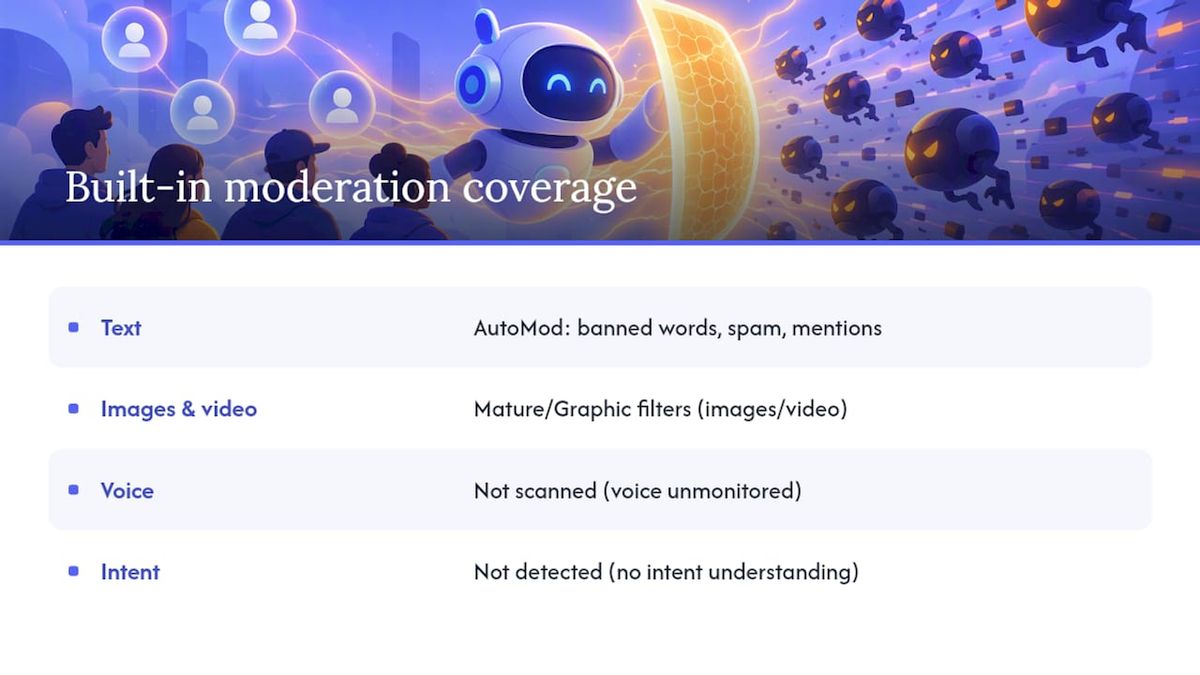
AutoMod handles text: banned words, spam patterns, and mention flooding. It's rule-based and fast, but it doesn't understand images, voice, or intent.
Discord's Mature Sexual Media and Graphic Media filters work on a separate track entirely. They scan images and video, not text or voice calls, and they feed into Teen Safety Assist rather than general-purpose moderation. Age-inference systems support those teen protections too, but they're not scanning your voice channels or private calls for content violations. That's a meaningful gap if your server leans on voice chat, because nothing built into Discord is listening there for harassment or abuse.
Discord has also built a dedicated AI and machine learning safety workstream, developed in part through a partnership with the European Center for Not-for-Profit Law to keep models aligned with real community harms rather than blunt keyword bans.
The false-positive risk is real and documented. In 2026, Discord disclosed an incident where an AI moderation bug wrongfully banned users over harmless images, a reminder that automated systems misfire even at platform scale, and that staged rollout isn't optional caution, it's basic risk management.
How Do You Evaluate a Third-Party Moderation Bot?
Vendor pages love to advertise "AI-powered" everything. What actually matters is narrower and more checkable.
- Detection scope: Does it catch spam waves and raids specifically, or just generic toxicity? Does it handle scam links, NSFW media, and suspicious avatar patterns, or only text?
- Rule authoring: Can you write rules in plain language ("silence anyone posting 5+ links in 10 seconds"), or are you stuck tuning an opaque model you can't inspect?
- Enforcement range: Look for graduated options, warn, silence, quarantine, auto-delete, full channel lock, not just a binary ban switch.
- Data handling: What does it log, how long does it keep message content, and does it share data with third parties?
Discord's own Terms of Service make clear that Discord does not audit or endorse third-party apps. Verifying a bot's privacy practices and permissions is entirely on you, the server owner, not the platform.
Pro Tip: Before granting a bot any moderation permission, check whether it needs "Manage Server" access or just "Manage Messages." Bots asking for more permission than their stated function requires are a red flag, regardless of how polished their landing page looks.
Building a Moderation Workflow That Mixes AI and Human Review
A workflow that goes straight from "off" to "fully automated" is how servers end up apologizing to wrongfully banned members. Stage it instead.
- Shadow-log everything first. Let the bot flag violations without taking action, then have a moderator review a sample of those flags against what actually happened in the channel. This is where you catch a model that thinks screenshots of code are NSFW content.
- Turn on soft actions for medium-confidence flags. Warnings, temporary silences, and message deletion carry low downside if the model gets it wrong, and they buy you real-world tuning data.
- Reserve hard, automatic enforcement for high-confidence cases only. Spam waves hitting dozens of channels in seconds, known scam link patterns, mass-join raids, these are the scenarios where speed matters more than nuance, and false positives are rare.
- Keep the operational scaffolding running underneath. Rotate staff through log review, publish an appeals channel or form, and update your public moderation policy whenever enforcement rules change.
Discord's own safety philosophy leans toward restorative, context-aware enforcement rather than blanket bans, and that principle scales down well to individual servers. A member who gets caught by an overzealous filter deserves a fast path back in, not silence.
Deployment Checklist: From Permissions to Rollback
Run through this before you flip any automated enforcement live.
- Audit bot permissions. Grant only what the bot's actual function needs. A spam-detection bot doesn't need "Manage Roles."
- Create dedicated test channels. Run a batch of representative messages, both violations and normal chat, through the bot before touching your live channels.
- Set your metrics before launch. Track false-positive rate, average moderation response time, and raid frequency so you know if the system is actually working.
- Define rollback and appeals before enabling hard enforcement. Know exactly how to disable an automation and how a wrongly-actioned member gets their case reviewed.
| Checklist Item | Why It Matters | When to Revisit |
|---|---|---|
| Permission audit | Limits damage if a bot is compromised or misconfigured | Every major bot update |
| Test channel runs | Catches false positives before they hit real members | Before enabling any new automation |
| Metrics tracking | Gives you evidence, not gut feel, on performance | Weekly during rollout, monthly after |
| Rollback plan | Lets you disable enforcement fast during an incident | Before every new automation goes live |
A raid response plan specifically is worth writing out in detail beforehand. Better Antispam's playbook on stopping a Discord raid walks through the lockdown sequence step by step, and it's the kind of thing you want documented before 200 bot accounts join in ten seconds, not while it's happening.
A Real-World Fit: How Better Antispam Maps to This Workflow
The staged workflow above isn't theoretical. It's how a bot like Better Antispam is meant to be run.
- Spam wave detection flags coordinated posting patterns in real time, the exact high-confidence case the workflow reserves for automatic enforcement.
- Real-time channel clean-up handles the aftermath of a raid without a moderator manually deleting hundreds of messages by hand.
- Verification options (button, CAPTCHA, math, word puzzle) sit at the front door, catching bot accounts before they ever reach a channel.
- Permission and sabotage monitoring catches the less obvious threat: a compromised moderator account changing server settings.
During a mass-join event, the difference between a server that recovers in minutes and one that spends a day cleaning up usually comes down to whether lockdown and clean-up were automated in advance, not improvised in the moment.
That's the gap staged deployment is meant to close: automation for the raids and spam waves you can predict, human judgment for everything else.
Fair Enforcement Builds the Trust That Keeps Communities Together
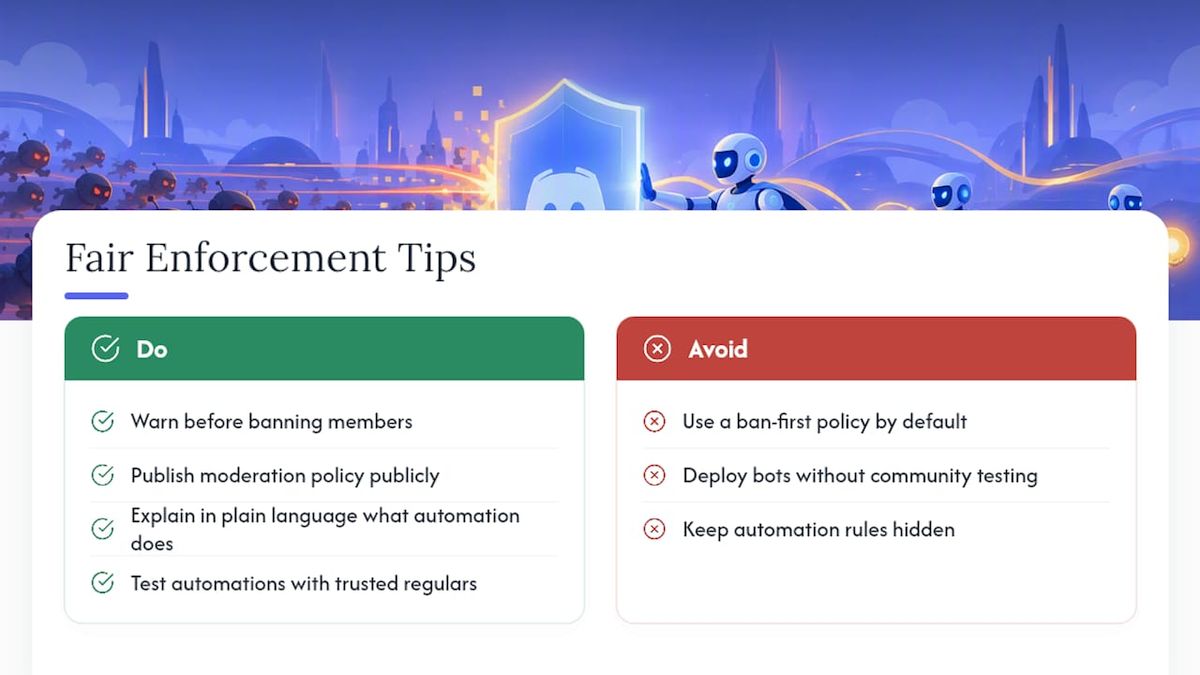
Ban-first policies feel efficient until a false positive hits a real member and the whole server watches how you handle it. That moment either builds trust or destroys it.
A better default: warn before you ban, publish your moderation policy where members can actually find it, and explain in plain language what your automation does and doesn't catch. Pull a few trusted regulars into testing new automations before launch. They'll catch edge cases your bot's documentation never mentioned, and they'll vouch for the system when someone else questions it.
— Adam
Get Your Server's Automated Defenses Running This Week
There are moderation bots that provide raid detection, channel clean-up, and verification layers as described in this guide, without requiring you to write moderation rules from scratch.

It maps directly onto the checklist above: install it in a test channel first, let it run in shadow mode while you watch how it flags activity, then turn on low-risk automations like verification and spam-wave silencing before trusting it with full lockdown authority. A staged adoption path is recommended so you don't hand over enforcement blind. Head to the Betterantispam landing page to see the current setup options and start your test deployment today.
Sources
FAQ
Does Discord Have Automated Moderation?
Yes. Discord's AutoMod handles text-based rule violations like banned words and spam patterns, and separate systems handle image and video filtering as part of its safety library. Discord also runs a broader AI and machine learning safety workstream that pairs automated detection with human review for nuanced cases.
Is AI Moderation Allowed on Discord?
Yes, both Discord's own AI tools and third-party moderation bots are allowed. Server owners can add moderation apps freely, but Discord's Terms of Service place responsibility on the owner to vet those apps' data practices, since Discord does not audit or endorse them.
How Do I Turn Off or Limit AI Moderation on Discord?
You can disable AutoMod rules individually in Server Settings under Safety Setup, and most third-party bots offer a shadow-log or monitor-only mode that stops enforcement while still logging flags. Disabling hard enforcement first, before removing a bot entirely, is the safer rollback step if you're seeing false positives.
Is NSFW Content a Discord Terms of Service Violation?
It depends on context and channel settings, not the content type alone. Discord requires NSFW channels to be properly age-marked, and its Mature Sexual Media filters are built to support teen safety features rather than issue blanket enforcement, so the same image can be compliant in one channel and a violation in another.
What Should I Do if AI Moderation Wrongly Bans a Member?
Have an appeals process in place before you need it, ideally a dedicated channel or form a banned member can use to request review. Public incidents like the 2026 wrongful-ban bug show that even large platforms misfire, so a fast, transparent path back in matters more than trying to prevent every false positive outright.
Recommended
Created with BabyLoveGrowth to get found on Google and AI search





















































