
Stop Spam and Raids with Multi Modal Discord Member Screening for Mods


Deploy Discord's AutoMod spam filters and a bot-driven verification flow today, not next week. Member screening means automated, bot-driven checks that vet a new arrival before they get full posting access, and the fastest working setup pairs button or DM interaction checks with behavioral analysis. If a mass-join event hits while you set this up, pause invites and lock your channels immediately.
TL;DR: - Button or direct message interaction checks provide rapid, low-effort barriers resistant to simple automated joining scripts. - Combining low-friction verification methods with stronger puzzles and behavioral analysis creates an effective layered defense. - Proper setup includes AutoMod spam filters, appropriate verification levels, and a dedicated verification bot with least-privilege permissions and correct role hierarchy. - During a raid, immediate actions like pausing invites, locking channels, raising verification levels, and bulk applying bans are critical for containment. - Testing and adjusting member screening thresholds based on server size and activity helps balance security with community growth.
Table of Contents
- Which verification methods actually stop bots and raiders?
- How do you set up AutoMod and a verification bot together?
- What do you do in the first minutes of a raid?
- Getting bot permissions, intents, and rate limits right
- Where Better Antispam fits into a defense-in-depth setup
- Balancing onboarding friction against safety
- Get started with Better Antispam
- Sources
- FAQ
Which verification methods actually stop bots and raiders?
Not every verification method carries the same cost or the same protection, so match the method to your server's size and how discoverable it is.
Button interactions and DM challenges sit at the low-friction end. A new member clicks a button or replies to a bot's direct message, and the action is nearly impossible to script at scale without real effort, which makes it a solid first gate for most communities.
Math and word puzzles add moderate friction. A timed wait combined with a simple puzzle filters out unsophisticated bots while still letting a human clear the check in a few seconds.
Visual CAPTCHAs look stronger on paper but carry a real weakness: modern solving tools have caught up.
- Button or DM interaction checks: fast, low friction, resistant to simple scripted joins.
- Math or word puzzles with a timed wait: moderate friction, filters out unsophisticated bot scripts.
- Visual CAPTCHAs alone: familiar to users but increasingly beatable by automated solvers.
- Behavioral checks: monitor join patterns, account age, and message timing rather than a single one-time test.
A generalized visual CAPTCHA solver built with a vision-language model reached a success rate exceeding 60% across diverse visual challenges in one academic study. That number matters because it means a visual CAPTCHA used by itself is no longer the strong deterrent it once was.
The practical fix is chaining, not swapping. Start every new member at a low-friction gate, a button click or a DM reply, and reserve a stronger check, a puzzle plus timed wait, for accounts that trip suspicious signals such as a brand-new creation date or a join spike from many accounts at once. This keeps friction low for the vast majority of legitimate members while raising the bar precisely when it matters.
How do you set up AutoMod and a verification bot together?
Layering Discord's native tools with a dedicated bot takes about twenty minutes and gives you two independent lines of defense instead of one.
- Turn on AutoMod's spam filters, including Block Spam Content and Block Mention Spam, in Server Settings under Safety Setup.
- Set a Verification Level that matches your discoverability: a private community can stay lower, but a public or heavily indexed server should raise it.
- Install a verification bot using least-privilege OAuth scopes, granting only the permissions the bot needs to manage roles and messages, not full administrator access.
- Check whether your bot requires privileged intents such as GUILD_MEMBERS; these gate access to member lists and are subject to verification thresholds once an app runs in many servers, per Discord's developer documentation.
- Build verification flow templates: a button that triggers a DM token exchange, a timed waiting room paired with a puzzle, and a behavioral hold that flags accounts joining in unusual clusters.
- Test each flow with a secondary account before rolling it out to the live server.
Following Discord's own raid protection guidance, AutoMod and verification levels form the baseline every server should have before adding a specialized bot on top.
Rate limits deserve attention here too. Discord enforces gateway and REST limits, roughly a couple of commands per second per gateway connection, and a verification bot processing a join wave without backoff logic risks disconnecting at the exact moment you need it most.
Pro Tip: Queue bulk role changes and message purges in small batches rather than firing them all at once, so your bot stays connected during the raid it's supposed to be stopping.
What do you do in the first minutes of a raid?
Speed matters more than precision in the opening minutes of a raid. The goal is containment first, cleanup second.
- Pause invites immediately to stop the flood of new joins at the source.
- Lock affected channels so raiders already inside cannot post further spam.
- Temporarily raise the Verification Level to slow or block additional bad accounts from joining.
- Use mass-join detection to identify the batch of accounts that arrived together.
- Apply bulk moderation, timeouts or bans, against the identified batch rather than moderating one account at a time.
Once the immediate threat is contained, shift to recovery.
| Recovery step | Action |
|---|---|
| Report the incident | File a report with Discord Trust & Safety |
| Preserve evidence | Export message logs and screenshots before cleanup |
| Audit permissions | Review role and permission changes made during the raid |
| Restore normal settings | Return invites and verification level to standard once the threat clears |
Discord's raid protection guidance frames containment, pausing invites and locking channels, as the priority over manual moderation while an attack is active. Reporting to Trust & Safety afterward also helps flag the accounts involved so they can be acted on platform-wide.
Getting bot permissions, intents, and rate limits right
A verification bot only works safely if it has exactly the access it needs and nothing more.
- Least-privilege roles: give the bot a dedicated role placed below owner and admin but above regular members, so it can act on offenders without holding keys it does not need.
- Role hierarchy discipline: a bot cannot moderate a role positioned above its own, so plan the hierarchy before assigning permissions.
- Privileged intents: features like reading the full member list require intents such as GUILD_MEMBERS, which come with verification thresholds once an app operates across many servers.
- Rate limit awareness: automation that fires too many actions per second risks disconnection, so build in backoff and queuing rather than firing every action at once.
Treat these settings as something to revisit as your server grows, not a one-time setup. A configuration that worked for 500 members can behave differently once a server passes several thousand and starts attracting more automated attention.
Where Better Antispam fits into a defense-in-depth setup
Better Antispam is built around the same layered approach the sections above describe, applied specifically to spam waves, scams, and raid attempts.
- Automated mass-join analysis that flags coordinated join spikes as they happen.
- Verification flows covering button, CAPTCHA, math, and word puzzle checks, so you can chain low-friction and high-friction methods.
- Channel clean-up commands that remove raid damage in bulk rather than message by message.
- Permission change monitoring to catch staff sabotage or compromised moderator accounts.
For a fuller walk-through of containment tactics, see the 2026 raid playbook. Users report a drop in spam incidents after implementing such bots, and freemium models typically allow testing core screening features before considering paid upgrades.
Balancing onboarding friction against safety
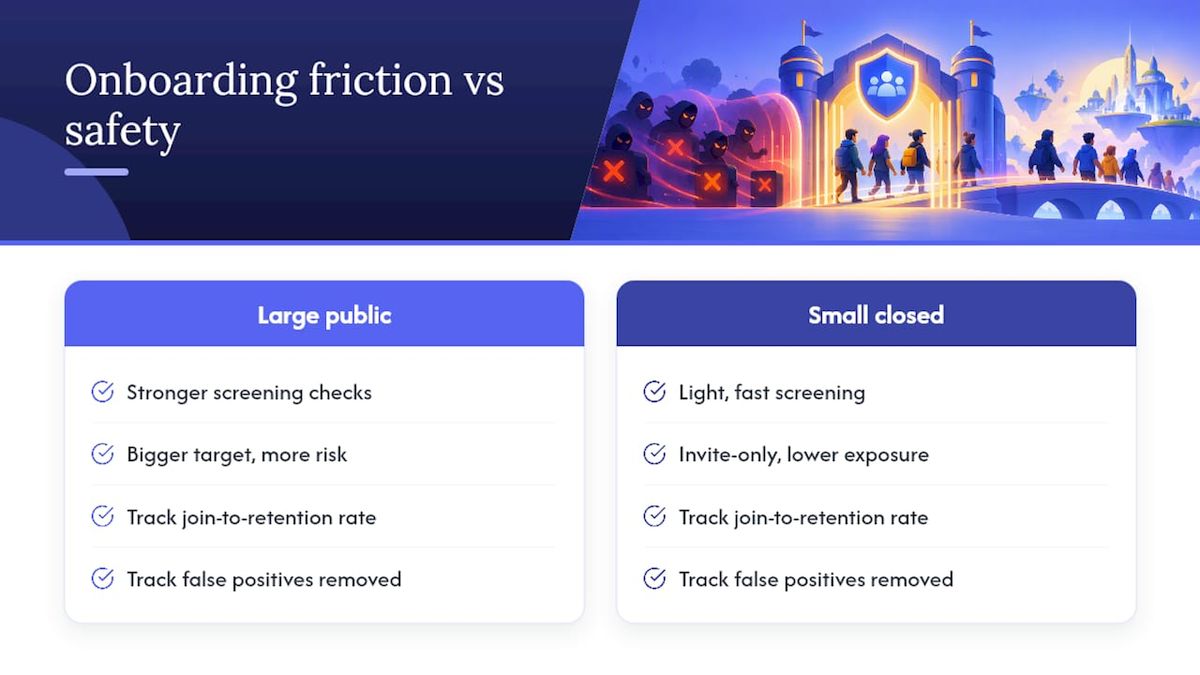
The hardest call in member screening is not which tool to use, it is how much friction your community can tolerate. A large, publicly listed server should lean toward stronger checks because it is a bigger target, while a small closed community built on invite links can usually stay light and fast.
Track join-to-retention rate, how many false positives you remove by mistake, and your raw spam incident count over time, then adjust. Run changes as small controlled tests rather than full rollouts, and always keep a manual appeal path open for a legitimate member caught by an overzealous filter.
— Adam
Get started with Better Antispam
Setting up layered screening by hand across AutoMod, a verification bot, and manual containment steps takes real effort to configure correctly. Better Antispam packages mass-join detection, multi-modal verification, and channel clean-up into one bot so you are not stitching together separate tools mid-raid.

- Install the bot from the Better Antispam landing page and grant it a dedicated moderator role.
- Configure your first verification flow, then review the raid response playbook for containment steps specific to your server size.
Sources
For readers who want to dig into the primary guidance behind this setup:
- How to Protect Your Server from Raids 101 – Discord
- Are CAPTCHAs Still Bot-hard? Generalized Visual CAPTCHA Solving with Agentic Vision-Language Model
FAQ
What is member screening on Discord?
Member screening refers to automated, bot-driven checks, such as button interactions, puzzles, or behavioral analysis, that vet a new member before granting full access to a server. It runs alongside, and typically before, any manual moderator review.
Why do visual CAPTCHAs fail against modern bots?
Visual CAPTCHAs increasingly struggle because automated solvers built on vision-language models have gotten much better at reading them. One study measured a generalized solver reaching about 60.7% success across diverse visual CAPTCHA sets, which is why defense-in-depth recommends pairing CAPTCHAs with other checks rather than relying on them alone.
How do you stop a Discord raid in progress?
Pause invites and lock affected channels first to stop the flow of new accounts and further spam. Follow with bulk moderation against the joined batch, then report the incident to Discord Trust & Safety and audit permission changes once things are stable, as outlined in Discord's own raid guidance.
What permissions should a verification bot have?
A verification bot should run on a dedicated role with only the permissions it needs, positioned below owner and admin roles but above regular members. Some features require privileged intents like GUILD_MEMBERS, which carry verification thresholds once an app is active in many servers.
Can Better Antispam replace manual moderation entirely?
Better Antispam automates mass-join analysis, verification flows, and channel clean-up, which removes most of the repetitive containment work during a raid. Human moderators still handle edge cases, appeals from false positives, and ongoing review of settings as the server grows.





















































