
3 Layers That Stop Discord Spam With AutoMod and a Verification Bot


Enable AutoMod's Block Spam Content and Block Mention Spam filters first, set their responses to Block message plus Send alert, then harden verification levels and strip @everyone and @here from non-admin roles. If joins or message volume outpace what your team can review by hand, add a moderation bot for mass-join detection and automated verification. These three layers stop the overwhelming majority of spam before it reaches your members.
TL;DR: - Enabling spam content and mention filters with appropriate responses prevents most spam before members see it, but false negatives still require external moderation bots. - Increasing verification levels and removing high-privilege mention permissions from untrusted members significantly reduce spam attack surfaces. - Using automation tools for join analysis, verification, and incident cleanup ensures swift response to raids, especially when join rates exceed manual review capacity. - Educating community members on spam policies and empowering them with simple reporting methods can supplement technical defenses and improve overall safety. - Regularly reviewing audit logs and permission settings helps identify patterns before incidents escalate and maintains a secure moderation environment.
Table of Contents
- How Discord's built-in spam defenses work and where to enable them
- Server configuration and permission hygiene to reduce spam attack surface
- Augment AutoMod with bots and automated workflows
- Detecting, stopping, and recovering from raid or mass-join events
- Monitoring, reporting, and account-level consequences
- How Better Antispam augments Discord defenses
- Educating members about spam policies and promoting community-led moderation
- Leveraging Discord's audit logs and monitoring tools to detect spam patterns
- Moderator perspective: balancing member experience with strict anti-spam settings
- Quick CTA: Better Antispam for real-time spam and raid defense
- FAQ
- Sources
How Discord's built-in spam defenses work and where to enable them
Discord's AutoMod system includes a Block Spam Content filter built on machine learning that flags unsolicited advertisements, invite-link spam, and mass copy-paste messages before they post. It works alongside a Block Mention Spam rule that catches messages pinging an excessive number of users or roles at once, a common raid tactic. Both filters live inside your server's moderation settings and take a few minutes to configure, according to Discord's AutoMod FAQ.
To turn them on:
- Open Server Settings and go to AutoMod.
- Create or edit a rule, then select Block Spam Content and Block Mention Spam as trigger types.
- Choose your responses: Block message stops the post outright, Send alert notifies a moderation channel, and Timeout removes posting ability for a set period.
- Set a mention limit appropriate to your server's size (the filter supports limits up to 50 mentions per message, per the AutoMod FAQ).
- Save the rule and monitor your alert channel for the first few days to confirm it behaves as expected.
Exemptions matter, but use them sparingly:
- Exempt only roles that genuinely need to post links or mention many users, such as event organizers.
- Exempt announcement or bot-command channels rather than entire roles when possible.
- Review your exemption list every few months and remove anyone who no longer needs it.
AutoMod's trigger types include KEYWORD, SPAM, and MENTION_SPAM, with actions like BLOCK_MESSAGE, SEND_ALERT_MESSAGE, and TIMEOUT, giving moderators granular control over how each threat gets handled, according to Discord's developer documentation. Even well-tuned filters have blind spots. AutoMod does not inspect direct messages between members, it can miss friend-request spam entirely, and some copy-pasta patterns slip through if they do not match known spam signatures. Reporting these false negatives to Discord helps retrain the underlying model, since Discord's Trust & Safety team notes that user reports feed directly into improving detection over time.
Server configuration and permission hygiene to reduce spam attack surface
Your server's verification level is the first checkpoint a new account meets, and it is worth setting higher than the default once your community grows past a handful of trusted members. A Medium or High verification level requires accounts to be registered on Discord for a set period before they can post, which filters out freshly created spam accounts automatically. For communities handling sensitive discussions or frequent raid attempts, requiring a verified phone or email on the account adds another layer that most throwaway bots cannot clear.
Permission hygiene matters just as much as verification. Many servers unintentionally hand spammers a megaphone by leaving mention permissions open to every member.
- Remove the ability to use
@everyoneand@herefrom every role except trusted moderators and admins. - Audit role assignments quarterly so former staff or inactive accounts do not retain elevated permissions.
- Apply the principle of least privilege to every role, not just bot accounts: give members only what their participation requires.
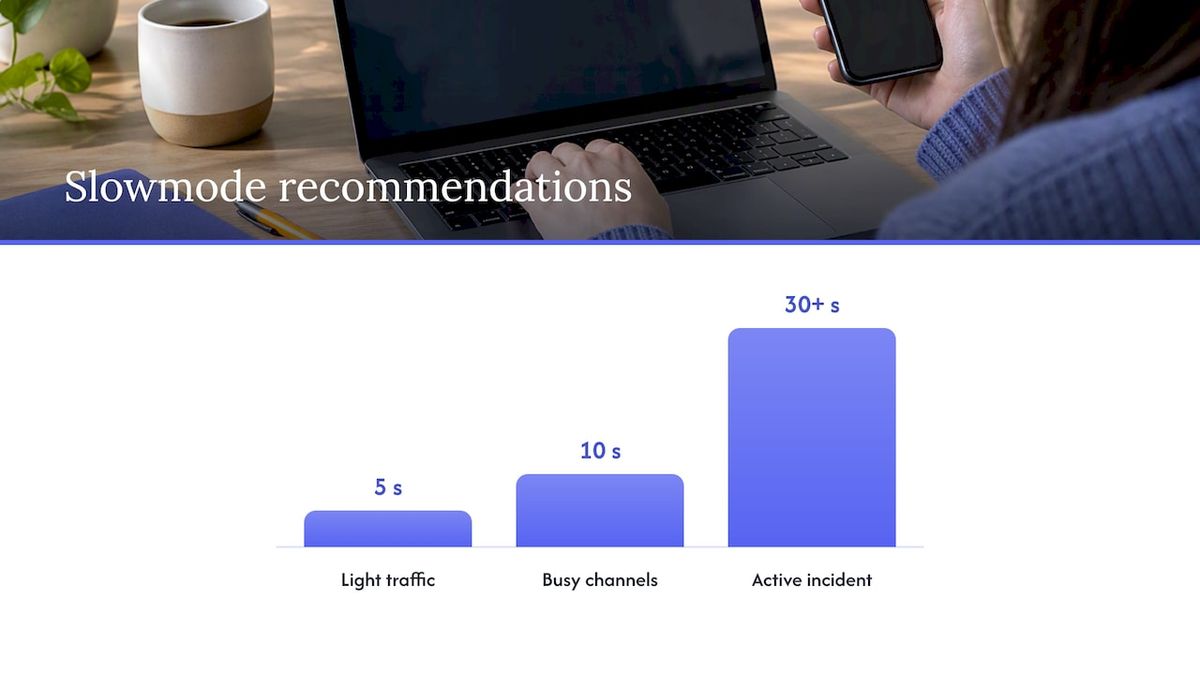
Slowmode and mention limits throttle high-velocity spam without banning anyone outright. A slowmode of 5 to 10 seconds in busy public channels slows down scripted flooding while barely affecting normal conversation, and tightening it to 30 seconds or more during an active incident buys your team time to respond. Mention limits set through AutoMod catch the raid pattern where dozens of pings land in a single message.
Pro Tip: Pause server invites the moment you suspect a raid, then rotate your permanent invite link afterward so the same URL cannot be reused by the same bot network.
Designating a single onboarding channel, rather than scattering invite links across many channels, also makes it easier to track where spam traffic is entering your server.
Augment AutoMod with bots and automated workflows
AutoMod handles message content well, but it was never built to analyze join behavior, run verification flows, or clean up after an incident. That is the work bots typically take on: mass-join analysis that flags unusual join velocity, CAPTCHA or button-based verification gates, silent mutes or timeouts applied the moment a suspicious pattern appears, and automated cleanup of flagged messages or channels.
- Grant a moderation bot only the permissions it actually needs, timeout and message management rather than full Administrator access.
- Set up a dedicated alert channel where the bot and AutoMod both report, so your team sees one unified feed instead of scattered notifications.
- Test new bot rules in a staging channel or with a lower enforcement level before rolling them out server-wide.
- Maintain an exemption list for verified staff and long-standing community bots to avoid accidental lockouts.
Pro Tip: Avoid granting Administrator to any bot by default. Most moderation tasks need only Manage Messages, Moderate Members, and Manage Roles.
Discord's own safety guidance recommends exactly this layered approach: AutoMod as the first line of defense, with bots added for mass-join analysis and automated verification. During a high-velocity raid, native rate limits and manual message deletion simply cannot keep pace with dozens of accounts joining per second. A bot that watches join patterns and applies verification preemptively stops the bulk of the damage far faster than a moderator deleting messages one at a time.
Detecting, stopping, and recovering from raid or mass-join events
A raid rarely announces itself before it starts, but the signals are consistent: a sudden spike in joins within minutes, synchronized messages or mentions posted across multiple channels at once, and a flood of identical invite links or suspicious URLs.
When you spot these signs, move fast:
- Enable CAPTCHA or button-based verification immediately to stop new accounts from posting unchecked.
- Pause invites server-wide so the attack cannot pull in reinforcements.
- Apply slowmode across high-traffic channels and lock posting entirely in the most affected ones.
- Mass-timeout the accounts matching the raid pattern rather than banning individually under pressure, which reduces the risk of catching legitimate members in the sweep.
Once the immediate threat is contained, recovery is its own task. Bulk-delete the spam messages, a step-by-step cleanup process makes this faster than manual deletion, then check your audit logs to confirm which accounts were involved and what permissions, if any, were changed during the incident. Rotate your invite links afterward and let your members know what happened and what changed, since transparency reduces confusion and repeat questions.
Pro Tip: Screenshot the raid in progress before you start cleanup. Evidence is harder to gather after messages are deleted.
If the raid involved coordinated harassment or clear malicious intent, escalate to Discord Trust & Safety with timestamps, message IDs, and account names rather than relying on memory. A detailed raid-response playbook walks through each of these steps in more depth.
Monitoring, reporting, and account-level consequences
When Discord detects suspicious behavior on an account, it can place that account in Limited Access, which restricts joining new servers, starting new direct messages, and sending outgoing friend requests, according to the Limited Access FAQ. This is often a precursor to a fuller suspension if the behavior continues.
Temporary suspensions issued under Discord's Warning System can last up to one year, while permanent suspensions last indefinitely, according to Discord's Warning System documentation. That distinction matters when you are deciding how seriously to treat a report.
Good reports move faster through Trust & Safety review. Include:
- Exact timestamps of the spam activity.
- Message IDs and the offending account's user ID.
- Screenshots showing the content in context.
Never include bot tokens, passwords, or other sensitive credentials in a report. Reporting flagged content also feeds back into Discord's spam detection models, so consistent reporting from moderators across many servers improves the underlying filter for everyone over time.
How Better Antispam augments Discord defenses
A specialized moderation bot closes gaps that native AutoMod leaves open. Better Antispam adds real-time automated responses, silencing a spammer mid-flood or locking a channel the instant a mass-join pattern appears, along with verification tools (button, CAPTCHA, math, or word puzzle) that reduce how much manual review falls on your staff.
- Mass-join spikes trigger automated CAPTCHA challenges before new accounts can post.
- Mention-heavy raid messages trigger silencing or timeouts without a moderator needing to act first.
- Post-incident cleanup runs through bulk deletion commands instead of manual message-by-message removal.
Adam, a contributor to the Better Antispam blog, covers these workflows in more detail across several setup guides. Consider evaluating a dedicated bot once your server regularly sees raids, your join volume outpaces what two or three moderators can monitor, or your existing AutoMod alerts are arriving faster than your team can act on them.
Educating members about spam policies and promoting community-led moderation
Technical filters only go so far when members do not understand what counts as spam or why a message got removed. Posting a short, visible rules section covering what AutoMod blocks, why mention limits exist, and how to report suspicious content cuts down on confused appeals and repeat offenses from members who simply did not know the policy.
Community-led moderation extends your reach without adding bot permissions or staff headcount. A simple /report command or a designated reporting channel lets ordinary members flag spam the moment they see it, often faster than any automated filter catches it. Recognizing active reporters, even informally, encourages more members to participate rather than scroll past.
It also helps to explain, briefly, why strict settings exist. A member who understands that mention limits exist to stop raid tactics is far less likely to push back when their own message gets blocked by accident. Pair this education with a clear, low-friction appeals path, a single channel or command where someone can ask a moderator to review a removed message, so legitimate members do not feel punished by the same systems built to protect them.
Leveraging Discord's audit logs and monitoring tools to detect spam patterns
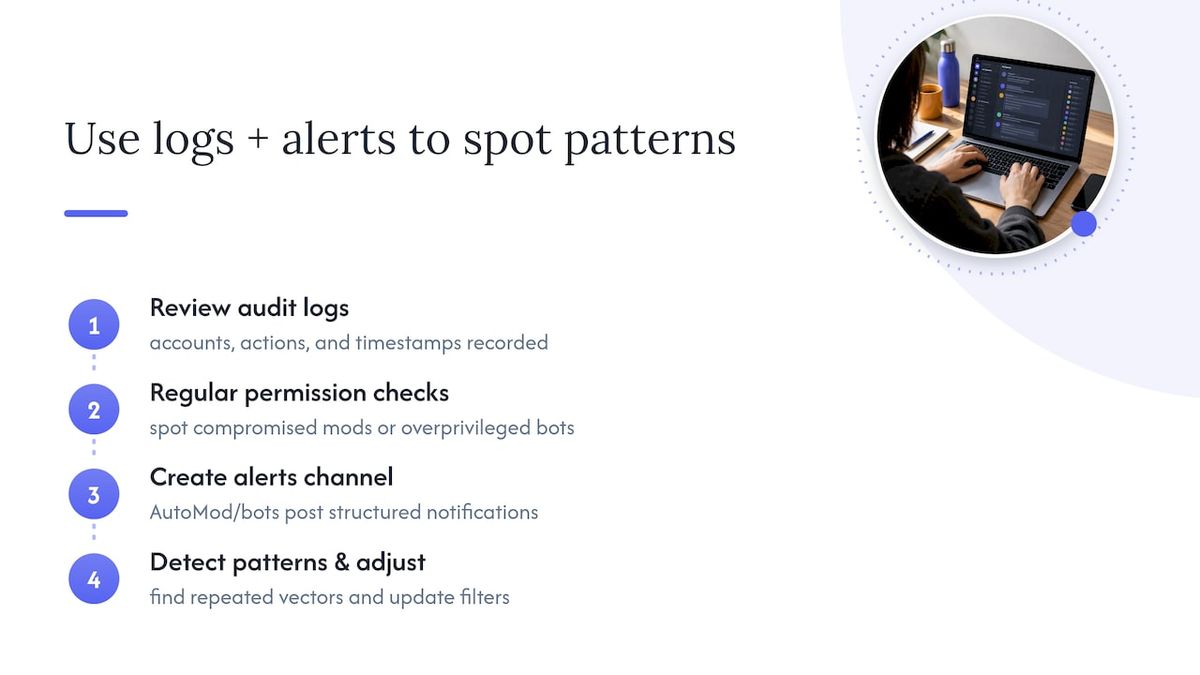
Every permission change, ban, timeout, and role update in your server gets recorded in the audit log, accessible from Server Settings. After any spam incident, this is the first place to check: it shows exactly which accounts were affected, which moderator or bot took action, and when, which matters both for confirming your response worked and for building a timeline if you escalate to Discord Trust & Safety.
Beyond reactive review, audit logs help you spot patterns before they become incidents. A string of permission changes you did not authorize, for instance, can indicate a compromised moderator account or a bot with excessive access, a scenario worth checking regularly rather than only after something visibly breaks.
Pairing the audit log with a dedicated alerts channel, where AutoMod and any moderation bots post structured notifications including message IDs and member IDs, gives your team a single feed to scan instead of piecing together what happened from memory. Over time, this combination makes it much easier to notice recurring spam vectors, the same invite link reused across multiple raid attempts, for example, and adjust your filters accordingly instead of reacting to each incident as if it were new.
Moderator perspective: balancing member experience with strict anti-spam settings
Strict filters stop more spam, but they also add friction for legitimate members, and the right balance depends on your server's size and purpose. Large public servers generally benefit from stricter default settings since anonymity invites abuse, while small private communities can run lighter friction with narrowly targeted rules instead of blanket restrictions. Roll out any new setting gradually, watch your alert channel closely for the first week, and treat a spike in legitimate complaints as your signal to dial a rule back rather than waiting for it to resolve itself.
— Adam
Quick CTA: Better Antispam for real-time spam and raid defense
Once your server outgrows manual review, Better Antispam handles mass-join detection, automated verification, and real-time channel locking so your team spends less time cleaning up and more time running the community.

- Works alongside your existing AutoMod rules rather than replacing them.
- Offers various verification options for new members.
- Available as a free bot with premium upgrades for additional moderation features.
Visit the Better Antispam product page to review setup docs and add it to your server.
FAQ
How long is a spam ban on Discord?
Temporary suspensions issued through Discord's Warning System can last up to one year, while permanent suspensions do not expire, according to Discord's Warning System documentation. The exact duration depends on the severity and history of the violation.
Why do I keep getting banned for spam on Discord?
Repeated bans usually mean an account has been flagged for behavior that matches known spam patterns, such as rapid messaging, suspicious links, or mass mentions. Checking the Limited Access FAQ can clarify whether an account is restricted rather than fully banned, since the two have different causes and remedies.
Is Discord server nuking illegal?
Discord's own policies treat server nuking, the mass deletion of channels or mass-banning of members, as a serious safety violation subject to account suspension rather than a matter of law. Discord's safety guidance recommends layered defenses like verification levels and permission hygiene specifically to prevent this kind of attack.
Why is Discord flagging me as a spammer?
Accounts get flagged when their behavior matches patterns Discord associates with spam, such as posting identical messages across many servers, mass-mentioning users, or triggering AutoMod's content filters repeatedly. Reviewing the tips against spam and hacking page can help identify which behaviors commonly trigger these flags.





















































