
45 Day Limit: How Admins Export Discord Audit Logs and Protect Servers


The Discord audit log is your server's record of every administrative and moderation action, from bans to permission changes, stored automatically for 45 days. You need the VIEW_AUDIT_LOG permission to see it, and it never captures message content or chat history, only the actions taken and by whom. Once an entry expires, it's gone. There's no way to clear it manually or extend the window from inside Discord itself.
TL;DR: - The audit log only retains entries for 45 days, so server owners must regularly export data if they need longer-term records. - Viewing audit logs requires the VIEW_AUDIT_LOG permission, which can be assigned to trusted roles without giving full administrative control. - Filtering audit logs by action type, moderator, or timestamp helps quickly identify relevant events during investigations. - The log records who performed actions, what was changed, and the reasons given, but never captures message content or chat history. - Automatic tools combined with proper access controls provide a proactive security layer beyond just monitoring audit logs after incidents occur.
Table of Contents
- What Shows Up in a Discord Audit Log Entry
- How to Check Discord Audit Logs and Lock Down Access
- Filtering and Searching Discord Audit Logs
- Fetching Audit Logs Through the Discord API
- Retention, Exports, and What You Can't Undo
- Audit Log Best Practices for Server Security
- Why Logs Alone Aren't Enough
- A Proactive Layer for What Audit Logs Can Only Record After the Fact
- Sources
- FAQ
What Shows Up in a Discord Audit Log Entry
Every entry in a discord audit log follows a consistent structure, and knowing the fields saves you time when you're trying to reconstruct what happened after an incident.
- user_id: who performed the action
- action_type: what kind of action it was (ban, kick, role update, and so on)
- target_id: who or what was affected
- changes: the specific before/after values that changed
- reason: an optional text explanation, either typed by a moderator or supplied by a bot through the
X-Audit-Log-Reasonheader - timestamp: embedded in the entry's snowflake ID, giving you exact ordering
Common action types you'll see include member kicks and bans, role creation or edits, channel creation, updates, and deletion, permission overwrite changes on channels, and webhook modifications. The reason field matters more than people give it credit for. Bots that ban or kick users can populate it automatically, which means a well-configured moderation bot leaves you a trail even when the human moderator forgets to type an explanation.
One thing the audit log documentation makes explicit: message content is never recorded. If someone deletes a message, the log shows that a deletion happened and who triggered it, but not what the message said.
How to Check Discord Audit Logs and Lock Down Access
Viewing discord logs in the client takes three clicks once you know the path.
- Open Server Settings.
- Click Audit Log in the left sidebar.
- Scroll or filter by action type and member to narrow the results.
The permission gate is VIEW_AUDIT_LOG, managed the same way as any other Discord permission: Server Settings → Roles → select a role → Permissions. By default, Administrator grants it automatically, but you can assign it as a standalone permission to a lower role if you want moderators to see the log without handing them full admin control.
That separation matters more than most server owners realize. A moderator who can view discord logs but can't touch channel structure or server settings still gets full visibility into what happened, without the risk of that account causing damage if it's ever compromised.
Pro Tip: Create a dedicated "Log Reviewer" role with only VIEW_AUDIT_LOG enabled. Assign it to trusted staff who handle reports but don't need broader admin rights. It shrinks your attack surface without slowing anyone down.

Before granting the permission to anyone, run a quick checklist: confirm the role has no unnecessary elevated permissions attached, verify it's not stacked on top of Administrator by accident, and document who holds it so you can review that list quarterly.
Filtering and Searching Discord Audit Logs
The audit log interface lets you filter by action type and by moderator, and combining both narrows results fast when you're chasing a specific incident.
- Filter by action type when you know what happened but not who did it (all bans, all channel deletions, all role edits).
- Filter by moderator (user_id) when you suspect a specific account and want their full activity history.
- Use the timestamp embedded in each entry to reconstruct sequence when several actions happened close together.
A typical workflow: a channel disappears and nobody claims responsibility. Filter the log for "Channel Delete" events, check the timestamp against your Discord activity history from around that time, and cross-reference the user_id against your staff roster. If permissions changed right before the deletion, that shows up too. The changes array on a permission-overwrite entry lists exactly which permission flipped from false to true, which is usually the smoking gun in privilege-escalation cases. Entry ordering runs newest first by default in the client, so recent incidents surface immediately without scrolling.
Fetching Audit Logs Through the Discord API
For anyone building a custom dashboard or export script, the endpoint is GET /guilds/{guild.id}/audit-logs, and it requires the same VIEW_AUDIT_LOG permission as the client view.
user_id: restrict results to a specific moderator or botaction_type: filter by a single action type (numeric enum defined in Discord's docs)before/after: paginate by entry ID, withbeforereturning the newest entries first andafterreturning the oldest firstlimit: how many entries to pull per request, capped between 1 and 100
The discordkit API reference documents these parameters directly and is worth bookmarking if you're scripting recurring pulls. If you're working in JavaScript, the discord.js guide covers library methods like fetchAuditLogs, which wraps this endpoint and handles pagination for you. Bots that populate the reason field do it through the X-Audit-Log-Reason request header, not a body parameter, which trips up a lot of first-time integrators.
Retention, Exports, and What You Can't Undo
Discord holds audit entries for 45 days, and there's no setting, command, or premium tier that extends that window or lets you manually clear the log. Once an entry ages out, it's deleted permanently.
- Entries expire automatically after 45 days with no admin intervention possible.
- A user's personal data package from Discord can include audit actions tied to that specific user for roughly 90 days, which is longer than the server-side window but only covers actions involving that one account.
- If your community needs longer institutional memory, schedule periodic API exports and store them somewhere tamper-evident, not just a text channel or a shared spreadsheet anyone can edit.
Treat the 45-day window as a hard deadline. If you're running a large community or handling anything with compliance implications, build the export habit before you need it, not after a dispute makes you wish you had six months of history instead of six weeks.
Audit Log Best Practices for Server Security
Good discord server logs practices come down to five habits, and most servers only do one or two of them.
- Restrict VIEW_AUDIT_LOG with role-based access control, and rotate that access whenever staff turnover happens. A departed moderator who still holds the permission is a quiet liability.
- Export logs on a schedule if you need records past 45 days. Weekly or monthly pulls through the API, stored in secure archive storage, cover most compliance and dispute-resolution needs.
- Set alert thresholds for anomalous spikes, like a sudden run of bans or permission changes in a short window. The CISA guidance on audit log monitoring recommends documented monitoring processes for exactly this reason.
- Pair logs with proactive moderation tooling. A bot like Better Antispam can block raids and spam waves in real time, which means fewer entries you ever have to investigate.
- Write a short incident playbook that connects an audit log finding to a remediation step, so nobody's improvising during an active raid.
Pro Tip: Best practices for logging generally call for centralizing and protecting logs with RBAC and automated alerting rather than treating them as a passive record nobody checks until something breaks.
Why Logs Alone Aren't Enough
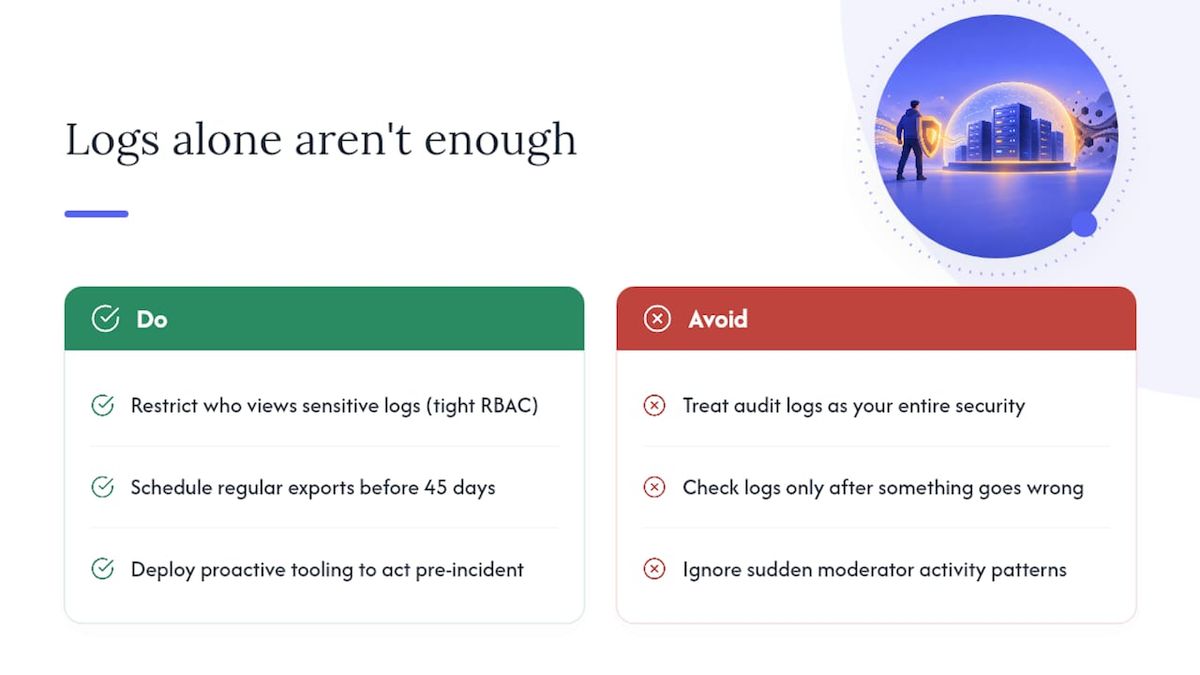
Audit logs answer the question "what happened," but they answer it after the fact. That's their real limitation: they're a forensic tool, not a preventive one, and no amount of careful log review stops a raid while it's happening. I've seen servers treat the audit log as their entire security strategy, checking it only when something already went wrong, which is a bit like reviewing security footage after a break-in and calling that your security system.
The better posture layers three things: tight RBAC on who can view sensitive logs, scheduled exports so nothing valuable ages out at 45 days, and proactive tooling that acts before incidents generate log entries at all. One pattern worth watching for: a sudden cluster of role changes or bans from a single moderator account outside their normal hours often signals a compromised login, and catching that pattern in the log is what triggers the credential reset, not luck.
— Adam
A Proactive Layer for What Audit Logs Can Only Record After the Fact
Reading the audit log tells you what already happened. Some bots are built to reduce how often you need to read it for bad reasons, by catching spam waves, raids, and suspicious permission activity in real time instead of after the damage is done.

It automatically blocks spam and scam waves as they start, locks channels or silences accounts during raid attempts, and flags unusual permission changes so a compromised moderator account doesn't quietly do damage before anyone checks the logs. Automatic channel cleanup handles the aftermath if something does slip through, so you're not manually deleting hundreds of messages by hand. None of this replaces your audit log, it works alongside it, giving you fewer incidents to investigate in the first place. If you're tired of your logs being the only thing standing between your server and chaos, check out Better Antispam and see what proactive coverage looks like for your community.
FAQ
What does audit log mean in Discord?
A discord audit log is the automatic record of administrative and moderation actions taken in a server, including bans, kicks, role changes, and channel edits. It shows who took the action and when, but it doesn't record message content.
Where can I see my Discord audit log?
Go to Server Settings → Audit Log in the Discord client, provided your role has the VIEW_AUDIT_LOG permission. Developers can also pull it programmatically through the GET /guilds/{guild.id}/audit-logs endpoint.
Can you see deleted messages in the Discord audit log?
You can see that a message was deleted and who deleted it, but not the message's actual content. Discord's audit log system intentionally excludes chat content from every entry type.
Can I clear an audit log on Discord?
No, admins cannot manually clear a discord audit log. Entries expire automatically after 45 days, and there's no setting or command that removes them sooner.





















































